C# Corner
ASP.NET MVC 5 Authentication Filters
Learn how to use the new Authentication filters in ASP.NET MVC 5, currently in developer preview.
ASP .NET MVC 5 is currently under developer preview, and is included in the recently-released Visual Studio 2013 Developer Preview. Today I'll be covering how to use the new Authentication Filters included in the ASP.NET MVC 5 preview.
If you've done any development with ASP .NET MVC, you've more than likely used the Authorization attribute to enforce role-based security within your Web site. With MVC 5, you can now apply an Authentication filters to your controller to allow users to authenticate to your site from various third-party vendors or a custom authentication provider.
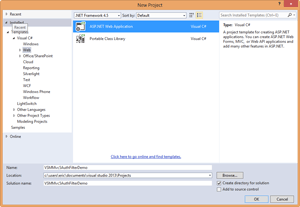
When applied to an entire controller class or a particular controller action, Authentication filters are applied prior to any Authorization filters. Let's see an Authentication filter in practice. Create a new C# ASP .NET Web Application, as seen in Figure 1.
 [Click on image for larger view.]
Figure 1. The new ASP.NET Web application project.
[Click on image for larger view.]
Figure 1. The new ASP.NET Web application project.
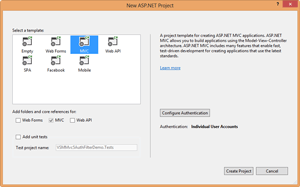
Then select MVC for the ASP.NET project type, as seen in Figure 2.
 [Click on image for larger view.]
Figure 2. The new ASP.NET MVC project.
[Click on image for larger view.]
Figure 2. The new ASP.NET MVC project.
Let's first look at how to implement a custom authentication filter that will simply redirect the user back to the login page if they're not authenticated. Create a new directory named CustomAttributes in your project. Next, create a new class named CustomAttribute that inherits from ActionFilterAttribute and IAuthenticationFilter:
public class BasicAuthAttribute: ActionFilterAttribute, IAuthenticationFilter
The IAuthenticationFilter interface defines two methods: OnAuthentication and OnAuthenhenticationChallenge. The OnAuthentication method is executed first and can be used to perform any needed authentication. The OnAuthenticationChallenge method is used to restrict access based upon the authenticated user's principal.
For this simple example, I'll only be implementing the OnAuthenticationChallenge method and will leave the OnAuthenitcation method blank:
public void OnAuthenticationChallenge(AuthenticationChallengeContext filterContext)
{
    var user = filterContext.HttpContext.User;
    if (user == null || !user.Identity.IsAuthenticated)
    {
        filterContext.Result = new HttpUnauthorizedResult();
    }
}
Here's the complete BasicAuthAttribute implementation:
using System.Web.Mvc;
using System.Web.Mvc.Filters;

namespace VSMMvc5AuthFilterDemo.CustomAttributes
{
    public class BasicAuthAttribute : ActionFilterAttribute, IAuthenticationFilter
    {
        public void OnAuthentication(AuthenticationContext filterContext)
        {
        }

        public void OnAuthenticationChallenge(AuthenticationChallengeContext filterContext)
        {
            var user = filterContext.HttpContext.User;
            if (user == null || !user.Identity.IsAuthenticated)
            {
                filterContext.Result = new HttpUnauthorizedResult();
            }
        }
    }
}
You can now test out the BasicAuthAttribute by applying it to the HomeController class. Open up the HomeController class file, then add a using statement for your CustomAttributes namespace:
using VSMMvc5AuthFilterDemo.CustomAttributes;
Then apply the custom attribute to the HomeController class:
[BasicAuthAttribute]
public class HomeController : Controller
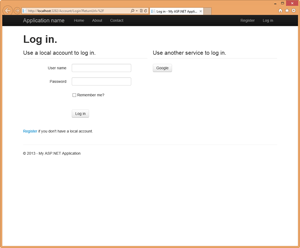
When you run the application, you should now be automatically redirected to the login page (Figure 3).
 [Click on image for larger view.]
Figure 3. BasicAuthAttribute in action.
[Click on image for larger view.]
Figure 3. BasicAuthAttribute in action.
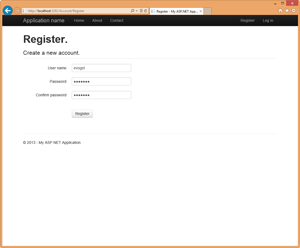
In order to view the homepage, you must register a user account, as seen in Figure 4.
 [Click on image for larger view.]
Figure 4. Registering a user.
[Click on image for larger view.]
Figure 4. Registering a user.
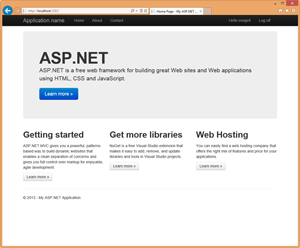
Once your user is registered, you'll be automatically redirected to the homepage (see Figure 5).
 [Click on image for larger view.]
Figure 5. The homepage, after user registration.
[Click on image for larger view.]
Figure 5. The homepage, after user registration.
As you can see, it isn't overly complex to implement a custom authentication filter within ASP.NET MVC 5. Currently, documentation on the feature is very slim. I can see the potential for using a custom authentication filter to perform authentication auditing or logging, or using a custom attribute to allow users varying access to parts of your site based upon their authentication provider or identity tokens.
About the Author
Eric Vogel is a Senior Software Developer for Red Cedar Solutions Group in Okemos, Michigan. He is the president of the Greater Lansing User Group for .NET. Eric enjoys learning about software architecture and craftsmanship, and is always looking for ways to create more robust and testable applications. Contact him at [email protected].