Tips and Tricks
Save Web Development Time with Web Essentials
Visual Studio developers can use a number of Web Essentials features to speed up Web development.
If you perform any web development with Visual Studio then Web Essentials will save you hundreds of hours. It is available as a free extension for Visual Studio 2010 and newer.
Web Essentials adds many improvements to all aspects of Web development, including:
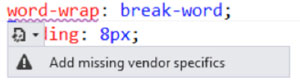
CSS Vendor Prefixes -- A lot of the CSS 3 properties only work cross-browser if vendor-specific properties are added. Web Essentials can add them for you and keep them in-sync, as shown in Figure 1.
 [Click on image for larger view.]
Figure 1: Warning To Add Vendor-Specific Prefix
[Click on image for larger view.]
Figure 1: Warning To Add Vendor-Specific Prefix
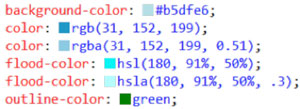
Color Previews -- In Figure 2, you'll notice that color swatches are included that can make it easier to see the color you want to use.
 [Click on image for larger view.]
Figure 2: Color Swatches Offer Previews of Colors Being Used
[Click on image for larger view.]
Figure 2: Color Swatches Offer Previews of Colors Being Used
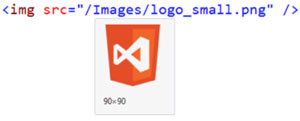
Image Previews -- See the image when the mouse hovers the img tag, as shown in Figure 3.
 [Click on image for larger view.]
Figure 3: Hover To See the Tagged Image
[Click on image for larger view.]
Figure 3: Hover To See the Tagged Image
Zen Coding --Zen Coding is a faster way to write HTML using a CSS style selector syntax. For example, to add a table with five rows, three columns, and populate each table cell with two Latin words, enter the following on a blank line and press TAB:
TABLE>TR*5>TD*3>LOREM2
Find out more about Zen Coding here.
If you're not using Web Essentials, you should. You can find out more here.
About the Author
Mark Price, MCT, MCSD, is a full-time trainer for UK-based Firebrand Training. He has more than 20 years of experience working in the IT and developer industry, including a two-year stint working at Microsoft. His expertise covers a number of Microsoft technologies (Azure, ASP.NET Web Forms and MVC, Web API, WCF, jQuery, C#, LINQ, Entity Framework, WPF, and Windows Store apps), HTML5, XAML, and Google developer technologies and the Google App Engine.