News
Visual Studio 2017 15.4 Officially Released
Microsoft announced the official release of Visual Studio 15.4, a minor update that fixes bugs, improves performance and adds some new features.
After a series of previews, the final IDE update provides improvements in setup and installation; editing functionality; extensibility and more.
One major new feature is support for .NET Standard 2.0, which can be used with Universal Windows Platform (UWP) development on the Windows Fall Creators Update of Windows 10.
"With the upcoming release of the Windows 10 Fall Creators Update, you will be able to utilize the power of .NET Standard 2.0 when building UWP applications," said John Montgomery, director of Program Management for Visual Studio, in a blog post today. ".NET Standard 2.0 brings an additional 20,000+ .NET APIs to Windows 10 UWP developers, many of these will be familiar if you do Windows desktop development (WPF, Windows Forms, etc…).
"To build UWP apps using the new .NET Standard 2.0 APIs, make sure you have the Windows 10 Fall Creators Update SDK set as the minimum version of your project."
The Windows 10 Fall Creators Update SDK is automatically installed when the UWP development workload is installed in Visual Studio.
Montgomery also emphasized several productivity improvements.
"There are a handful of new productivity features that will help you be more efficient and effective as you develop your code," he said. "If you're a C#, VB, or Python developer, you can navigate around your project faster because Ctrl+Click will now Go To Definition. We've continued to improve performance and memory usage as compared to earlier releases.
"Lastly, we've refined Live Unit Testing (LUT) by making it easier to find and start. LUT Integration with Task Center Notification is also improved, we now show LUT background processing notification in Task Status center so that user can easily figure out what is happening when LUT is enabled. In addition to MSTest v2, LUT now also supports MSTest v1."
In addition to the above new features, Microsoft provided this complete "what's new" list in the official release notes:
- The new Setup and Installer launch banner lets developers know when an installation is successful. Microsoft added a new warning message at the end of an install that contains links to the Developer Community for additional help.
- Microsoft made improvements to XAML. Developers can now edit or remove XAML resources and add ControlTemplates.
- The Universal Windows Platform Development workload now comes with the Windows 10 Fall Creators Update SDK.
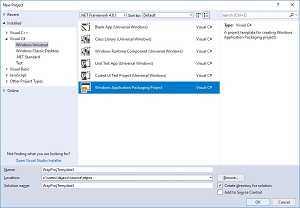 [Click on image for larger view.] The New Windows Application Packaging Project Template for Windows Store or 'Modern Distribution' (source: Microsoft).
-
The Windows Application Packaging Project provides new project templates that help package any Windows projects into an .appx container (see figure above).
- .NET Core 2.0 is included by default for Web Development and .NET Core Workloads.
- Coders can deploy, test, and debug apps directly on iOS and Android devices with Xamarin Live.
- Added support for CMake 3.9 and more flexible CMake project structures.
- Developers can now target Linux from your CMake projects. This lets developers use existing an CMake code base as a solution without needing to convert it to a VS project.
- Microsoft improved Unity support in Visual Studio Tools and added the Set Instruction Pointer feature under the new runtime.
- The Android SDK is now being installed to a private location.
- R Tools now has support for Linux remoting and RMarkdown including live editing, brace matching, and code completion.
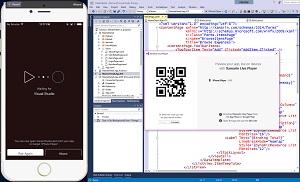 [Click on image for larger, animated GIF.] Xamarin Live Player in Action (source: Microsoft).
Xamarin Live Player was another point of focus for Montgomery. "The Xamarin Live Player enables you to develop, test, and debug mobile apps directly on your iOS and Android devices, all you need is Visual Studio and a device," he said. "Optimized for Xamarin.Forms, you can modify your XAML code and see changes reflected in real-time on device without having to compile or wait for a full deploy. This functionality is just a checkbox away, so be sure to give it a try and let us know what you think."
Speaking of Xamarin, Visual Studio for Mac also received its own minor update, moving it to version 7.2, which adds some new functionality and fixes some bugs. New features include: the ability to select .NET Core 2.0 for installation alongside Visual Studio for Mac directly in the installer; Docker support for ASP.NET Core apps; support for creating iOS 11 and Android 8.0 Oreo apps with Xamarin.
The new release also fixes several annoying bugs, such as deleting a file from the Solution Explorer not deleting the actual file; freezes during some copy/paste actions and certain other scenarios, incorrect placement of parentheses with auto-complete, and more.
More recent coverage of Visual Studio 2017:
About the Author
David Ramel is an editor and writer at Converge 360.