News
What's New in Visual Studio Code January 2019 Release
The latest monthly release (January 2019, version 1.31) of the cross-platform Visual Studio Code editor comes with the usual plethora of bug fixes, tweaks and new features, with many focused on the extension mechanism that powers the open source project.
These extensions come from many sources ranging from individual developers to corporate dev teams, with several popular offerings on the Visual Studio Code Marketplace having been downloaded tens of millions of times.
The January update includes several extension-related initiatives including:
- Updated Extension API documentation that has been completely rewritten with extension guides.
- Extension authoring changes including: a new change event; the ability to open resources in a browser; a new global storage path -- ExtensionContext.globalStoragePath -- that points to a local directory with write/read access; and more.
- The ability to install extensions without forcing a reload or restart of VS Code.
- Network proxy support for extensions such that the setting Http: Proxy Support (http.proxySupport) now enables network proxy support for all extensions by default.
- All extensions will run on an updated version of the Electron platform that powers VS Code, which comes with update from Node.js 8.9 to v10.2.0.
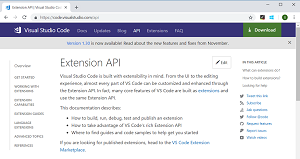 [Click on image for larger view.] Updated Extension API Documentation (source: Microsoft).
Regarding the Extension API, Microsoft said it rewrote its documentation and moved it to its own table of contents. The documentation includes articles to:
The January milestone, like all others, also includes proposed extension APIs that extension authors can try out, provided they:
- Participate in the Insiders program (early access to new builds) because proposed APIs change frequently.
- Have this line in the package.json file of an extension: "enableProposedApi": true.
- Copy the latest version of the vscode.proposed.d.ts file into a project.
"Note that you cannot publish an extension that uses a proposed API," the dev team said in a blog post today (Feb. 6). "We may likely make breaking changes in the next release and we never want to break existing extensions."
Among a bevy of other new features and bug fixes, the dev team especially highlighted the following:
Furthermore, the team categorized some new stuff according to related VS Code focus areas:
- Workbench -- Zen Mode hides line numbers, new Screencast mode shows keystrokes.
- Editor -- Smart selection improvements, tune Reference CodeLens location.
- Integrated Terminal -- ConPTY support on Windows, Find improvements.
Visual Studio Code source code is listed on GitHub, where the project shows 68,552 stars and 814 contributors.
About the Author
David Ramel is an editor and writer at Converge 360.