News
Visual Studio Gets 'Developer PowerShell' Prompt
On Jan. 17, 2018, Microsoft's Scott Hanselman asked Visual Studio developers if they would like a PowerShell prompt with pre-set PATH and Environment variables baked right into the IDE. They said yes.
Today, Aug. 20, 2019, Microsoft announced that in Visual Studio 2019 16.2, there is now a "Developer PowerShell" prompt along with a "Developer Command Prompt" under the Tools > Command Line menu.
This opens up new time-saving opportunities for Visual Studio developers as the two command-line schemes sport different capabilities and functionality, with DifferenceBetween.net explaining: "PowerShell is a more advanced version of the cmd used to run external programs like ping or copy and automate many different system administration tasks which are not accessible from cmd.exe. It's quite similar to cmd except it's more powerful and uses different commands altogether."
Now both options are available, via the menu items above or the Ctrl+Q search keyboard combination.
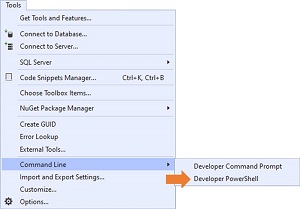 [Click on image for larger view.] VS PowerShell (source: Microsoft).
"Selecting either of these tools, will launch them in their respective external windows, and with all the predefined goodness (e.g. preset PATHs and environment variables) you already rely on," said Ruben Rios, a program manager 2 on the VS team in a blog post. "Opening them from Visual Studio automatically adjust their directories based on current solution or folder's location. Additionally, if no solution or folder is open at the time of invocation, their directories are set based on the 'Projects location' setting. This setting is located under Tools > Options > Locations."
When Hanselman published his informal Twitter poll last year, he actually asked if developers wanted a PowerShell prompt and if they would prefer it to the existing "Visual Studio Command Prompt" that sets the PATH and Environment variables for development work, using cmd.exe.
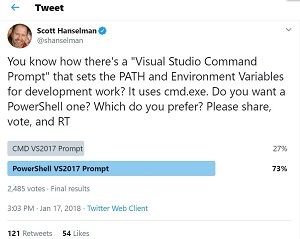 [Click on image for larger view.] The Poll (source: Twitter).
Of 2,485 voters, 73 percent preferred a PowerShell prompt, but many comments indicated a preference for both prompts, which is what Microsoft delivered. One developer pointed out that he had been seeking to use PowerShell with the VS command prompt for more than nine years.
Other developers had all kinds of ideas, with several offering a bash prompt as an alternative. One commenter said: "VS Command prompt is nice, but I like the bash-shell more (I do a lot on Mac and Linux). So I use cygwin on windows (if possible) or use the git-bash shell from git4windows mainly. I tried PS but it can't convince me."
Another said: "It's 2018 and we're talking about PATH Environment variables #fail."
Of course, now it's 2019 and we're still talking about PATH Environment variables.
About the Author
David Ramel is an editor and writer at Converge 360.