Visual Studio Toolbox
Didact Project Walks Through Tutorials in Visual Studio Code
A Red Hat developer has created the Didact project, a Visual Studio Code extension that puts the code editor to work as a tutorial guide and also showcases other things it can do via a combination of technologies.
"The vscode-didact extension does a few things, but mainly it shows what's possible through a combination of a simple Markdown or AsciiDoc file, the VS Code Webview, and calling easily accessible commands in VS Code," says the project's GitHub site.
One of those "few things" is helping with tutorials.
"The Didact project is designed to fill a void in Visual Studio Code, but what exactly is it? And more importantly, why should you care?" says Red Hat point person Brian Fitzpatrick in a Jan. 31 blog post. "Didact started as a 'What if?' VS Code doesn't provide a great way to walk users through a step-wise tutorial. 'What if' we could meet that need by combining the following:
- A simple markup language (such as Markdown or AsciiDoc).
- The ability to render the markup as HTML using the VS Code webview.
- A way to invoke the commands we create for each VS Code extension.
Fitzpatrick, who said it only took him about a day or so to come up with a prototype for the project, said it takes a “Tell Them, Tell Them Again, and then Tell Them What You Told Them” approach using the combination of aforementioned technologies.
"At a high level, the Didact framework is meant to instruct users in a useful way regarding how to complete tasks," he said. "The project does this through a combination of text, images, and active links that show VS Code functionality in action. The tricky part is that Didact should make it easy for non-developers to not only write the tutorials but also to interact with the commands they want to invoke. That's where markup languages like Markdown and AsiiDoc come into the picture. The power comes from pairing that simplicity with VS Code's simple command framework."
Key to the project is VS Code's API that lets extension developers invoke their created commands via unconventional means other than the usual menus, buttons and commands executed via the command palette. Fitzpatrick provides a demo that shows getting help by opening a Didact window in VS Code that describes how to use the command palette and a link to open it. Clicking on that link shows the user how to invoke a command via keys or menu items. All the "heavy lifting" for the functionality is provided through a URI:
didact://?commandId=workbench.action.showCommands&completion=Opened%20Command%20Palette
"If we unpack that URI, we find the command ID for showCommands in VS Code (which is triggered when you press Ctrl+Shift+P on your keyboard) and a completion message that shows what Didact did behind the scenes in a small information popup in the lower right corner," said Fitzpatrick, adding, "So, in this case, we told you what we were going to tell you, told you, showed it in action, and then showed it again, reinforcing the effects of clicking the right keys."
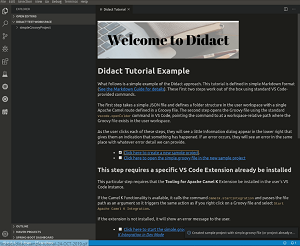 [Click on image for larger, animated GIF view.] Didact in Animated Action (source: Red Hat).
Fitzpatrick emphasized that the project is in the early stages, just getting started (the GitHub site shows only one other contributor), but future plans include a number of enhancements, including scaffolding support to help coders get started quickly via the automatic creation of a folder and file structure, complete with example files. Fitzpatrick is soliciting feedback at the GitHub repository. There, the project lists six "next steps" including "Look into finding ways to chain commands together so that you can do things like create a project and open a file all in one go."
About the Author
David Ramel is an editor and writer at Converge 360.