News
C++ Leads Visual Studio 2019 v16.8 Preview 3 Improvements
The third preview of Visual Studio 2019 v16.8 shows the usual assortment of improvements touching upon productivity for Git, the Roslyn .NET compiler platform, and especially C++.
In fact, C++ enhancements lead the list, numbering 12, with several of those involving C++20, a major revision of the language that just this month received final approval.
There were so many C++ improvements in Preview 3 -- released this week -- that the C++ dev team penned it's own blog post to cover "a huge collection of updates for C++ programmers."
Again, the aforementioned C++20 is front and center in the team's post, in which Sy Brand said, "We've improved support for major C++20 features across our compiler, standard library, and IDE. You can now use Modules, Concepts, Coroutines, and (some of) Ranges all in the same project!"
Along with Brand's blog post, the 12 items listed in the Preview 3 release notes can be seen here.
Regarding .NET productivity, specifically around Roslyn, the release notes say, ".NET compiler platform (Roslyn) analyzers inspect your C# or Visual Basic code for security, performance, design, and other issues. Starting in .NET 5.0, these analyzers are included with the .NET SDK. Code analysis is enabled, by default, for projects that target .NET 5.0 or later." Developers can also enable code analysis for earlier versions via a configuration setting.
Here's a summary of relatively minor tweaks affecting other areas of the IDE:
-
Git Productivity
- Create a new branch from an Azure DevOps work item
- Open a Git repository from a list of your local repositories in the Git menu
- The default source control provider is now Git instead of TFVC, which you can change from Tools - Options - Source Control
-
Debugger
- .NET Core Linux core dump debugging support
- .NET and .NET Core Auto Analysis
- .NET and .NET Core memory hot path auto analysis
-
XAML Tools (WPF, UWP & Xamarin.Forms)
- XAML Hot Reload Settings moved to "Debugging > Hot Reload"
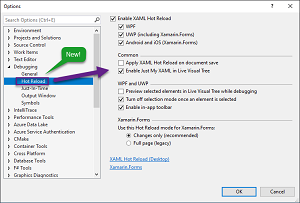 [Click on image for larger view.] XAML Hot Reload Consolidated Settings (source: Microsoft).
- Toolbox population from unreferenced NuGet packages
- Improving MVVM Support
-
Experimental Razor editor updates
- The new experimental Razor editor now supports a new Razor editing feature: Rename Razor components in markup from .razor files.
About the Author
David Ramel is an editor and writer at Converge 360.