News
Visual Studio Code's C++ Extension Hits v1.0 General Availability
Microsoft announced the first generally available release of the C++ extension for Visual Studio Code, graduating to version 1.0.
Hitting that milestone was a long time in coming, as the tool in the Visual Studio Code Marketplace debuted way back in April 2016. And hitting v1.0 was quite a bump up: Before this week's v1.0 release, the most recent previous update was v0.29, released in July.
According to Microsoft, those 3-plus years of preliminary development were worthwhile.
"Throughout the years, our customers have helped shape the direction of C++ development in VS Code by asking for key features and reporting bugs," said Julia Reid, program manager, Visual C++, in a Sept. 14 blog post. "The version 1.0 of the C++ extension for Visual Studio Code delivers these features in high quality. You asked, we listened."
Through those years previous to v1.0 GA status, the extension -- officially titled "C/C++," was installed more than 13.8 million times.
Some of the new features in v1.0 include:
- Support for Linux on ARM and ARM64: These architectures are typically used for mobile device CPUs. "The C++ extension brings a first-class development experience for Linux on ARM and ARM64, complete with IntelliSense and remote build and debug support," Reid said. "You can now develop C++ applications on Raspberry Pi with VS Code and Remote-SSH!"
- Easy IntelliSense configuration: This task, which Reid acknowledged "hasn't always been easy," is explained in a video embedded in her post that details features such as auto-completion, quick info and parameter help.
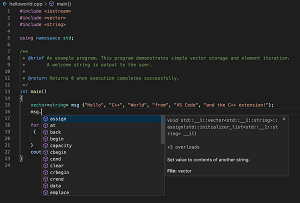 [Click on image for larger view.] Editing C++ Code with IntelliSense (source: Microsoft).
- Customizable code formatting: "All C++ code formatting settings from Visual Studio IDE are now supported in VS Code. What’s more, the C++ extension has built-in EditorConfig support for all these new settings, giving you more control and flexibility with code formatting than ever before."
As it has done with other language extensions for Visual Studio and VS Code, Microsoft bundled the C++ extension in with a bunch of related tools to create a "C/C++ Extension Pack."
It includes:
The extension pack, published on Sept. 8, has been installed about 1,900 times as of this writing, earning an average 3.6 rating from 373 developers who reviewed it.
C++ has been getting a lot of attention from Microsoft dev teams lately, as the new Visual Studio 2019 v16.8 Preview 3 was chock full of improvements related to the language.
VS Code C++ documentation is available here and developers can issues/suggestions feedback can be filed on GitHub here.
About the Author
David Ramel is an editor and writer at Converge 360.