News
Debugging, Workbench, Raspberry Pi Guidance Highlight VS Code Update
As regular users of Visual Studio Code know by now (courtesy of the release notes document that loads upon opening), the super-popular dev tool has received its monthly update.
The latest update to Microsoft's open source-based, cross-platform code editor features better debugging, many Workbench improvements and new guidance for Raspberry Pi installations.
All that and more comes in version 1.55, the March 2021 update, which as customary was publicized early in the next month.
The Raspberry Pi Foundation officially embraced VS Code in February, making it much easier to use the editor on the small single-board computer popular in both hobbyist and professional camps. That embrace made VS Code available via Raspberry Pi OS apt, a command-line utility for installing, updating, removing and managing deb packages on Ubuntu, Debian and related Linux distros.
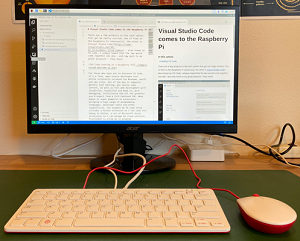 [Click on image for larger view.] Using VS Code on a Raspberry Pi to Write About VS Code Coming to Raspberry Pi (source: Jim Bennett).
In the new update to VS Code, the dev team announced a new topic providing installation guidance.
Debugging was also improved with breakpoint functionality, including a new inline menu for editing conditions and hit counts, whereas before the inline edit button automatically chose what condition to edit. JavaScript debugging was also enhanced.
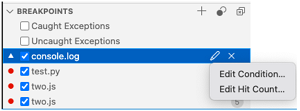 [Click on image for larger view.] Editing Breakpoint Conditions and Hit Counts (source: Microsoft).
The VS Code Workbench received much more attention, however, with a host of tweaks, fixes, improvements and new features, including:
- Updated brand icons for macOS Big Sur
 [Click on image for larger view.] "We've been working on updating the VS Code brand icons on macOS to match the new visual style of Big Sur." (source: Microsoft).
- Improved sash customization
- Improved List/Tree navigation
- Tab decorations on by default
- Resizing columns in Keyboard Shortcuts editor
- Extension management improvements
- Negative text filtering in Problems view
- Reporting Marketplace issues
- Configure tree hover delay
- Search in Open Editors
- Control the font size of the Source Control input
The usual array of tweaks and fixes were also applied to Accessibility, the Integrated Terminal, Notebooks and much more.
About the Author
David Ramel is an editor and writer at Converge 360.