News
New WinForms Default Font API: 'It Is Easy to Go Wild with This API'
What a difference a font makes.
Developers can now set an application-wide default font for WinForms projects with a new API.
It comes in the new .NET 6 Preview 5, which is primarily known for its SDK Workloads functionality, the foundation of the .NET unification effort.
However, in a subsequent blog post explaining what's new for WinForms desktop development in Preview 5, much attention was devoted to fonts.
Igor Velikorossov, software engineer, Windows Forms, explained problems that ensued when the dev team was able to "modernize" the old .NET Framework WinForms code, partially by changing the font from Microsoft Sans Serif to Segoe UI:
For example, the designer was no longer a true WYSIWYG, because Visual Studio process is run under .NET Framework 4.7.2 and uses the old default font, whereas a .NET application at runtime uses the new font. (Before you ask, we are working on a feature that will address this discrepancy.)
Furthermore, the font change caused problems in the migration of projects with pixel-perfect layouts. To make that easier, the "Allow set application-wide default font" pull request was created, resulting in this API:
void Application.SetDefaultFont(Font font)
Velikorossov noted that it can only be used before the first window is created. If it's tried after that, it will cause a InvalidOperationException.
Furthermore, he warned: "As a side note, it is easy to go wild with this API, and set the application default font to 'Chiller, 20pt, style=bold,italic,underline,' but please be mindful of your end-user experience."
So, of course, I had to try out exactly that with this code:
Application.SetDefaultFont(new Font(new FontFamily("Chiller"), 20, FontStyle.Bold|FontStyle.Italic|FontStyle.Underline));
That resulted in this:
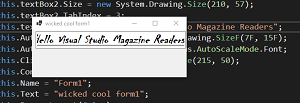 [Click on image for larger view.] Going Wild
I don't know, it looks fine to me.
Anyway, Velikorossov also noted the addition of more runtime designers, which in the old .NET Framework lived closely together with the runtime, but which were separated in the new open source, cross-platform .NET Core scheme (now just .NET 5, .NET 6 and so on).
"With this split, the Visual Studio Designer specific functionality will not be made publicly available because it makes no sense outside Visual Studio," he said. On the other hand, the general designer functionality can be used and useful outside Visual Studio, and in response to our customers' requests in Preview 5 we have ported a number of API that should enable building a general purpose designer (e.g. a report designer)."
So now, thanks to the Port missing designer infra PR, a whole bunch of designers are now available:
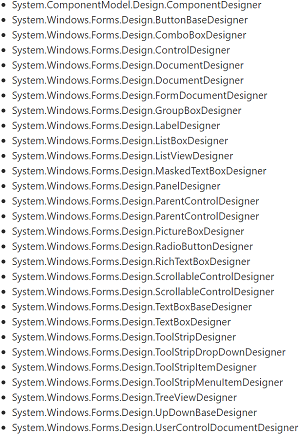 [Click on image for larger view.] Newly Available Designers (source: Microsoft).
In explaining why the APIs weren't ported initially, Velikorossov said: "When we were opening sourcing the Windows Forms SDK we needed to prioritize our work based on usage per our telemetry. Now we are porting designer-related API based on customer feedback, and each API request requires a use case that will warrant the work."
Developers who believe the team missed a designer critical to their applications can report that on GitHub.
About the Author
David Ramel is an editor and writer at Converge 360.