News
VS Code Python Tool Now Debugs Jupyter Notebooks
The October 2021 update to Python in Visual Studio Code continues to boost notebook functionality, now adding the ability to debug Jupyter Notebooks.
The whole Jupyter Notebooks experience was revamped with the August 2021 release, and the dev team has been improving things since then in the Python extension for Visual Studio Code, by far the most popular tool in the code editor's marketplace, with more than 43 million installs.
In the new October 2021 announcement, debugging support was unveiled. "To try it out, make sure you have ipykernel v6+ installed in your selected kernel," said Luciana de Melo e Abud, program manager for the Python tool, in an Oct. 7 blog post. "Then set a breakpoint, select the Debug Cell command from the drop-down menu next to the play button and start inspecting your code with all the features the debugger has to offer!"
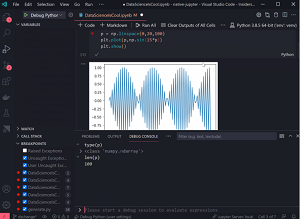 [Click on image for larger, animated GIF view.] Jupyter Notebook Debugging in Animated Action (source: Microsoft).
Debugging was also improved for Python projects in general. "When working with workspaces with no launch.json configuration present, the Python extension would display a debugger configuration menu every time you would debug your Python file or project," de Melo e Abud said. "This could be particularly annoying when debugging a web application with custom arguments (like Flask, Django or FastAPI, for example). Now you no longer need to provide a configuration every time you start debugging, as the first selection you make is reused for the rest of the session."
Also new is a Python walkthrough that details basic setup steps to improve the getting-started experience for Python in VS Code, including debugging Python files. It also covers installation, selecting an interpreter for a project and more.
Other changes and enhancements (with links to the related GitHub issues) include:
- python.testing.cwd setting is no longer ignored when discovering or running tests. (#8678)
- Upgraded to Jedi 0.18 and enabled it behind the language server protocol. Remove Jedi-related settings python.jediMemoryLimit and python.jediPath, since they are not used with the new language server implementation. (#11995)
- Removed support for rope, ctags and pylintMinimalCheckers setting. Refactoring, syntax errors and workspace symbols are now supported via language servers. (#10440, #13321, #16063)
- Default value of python.linting.pylintEnabled has been changed to false. (#3007)
All of the changes (88 issues were closed) are detailed in the GitHub changelog.
About the Author
David Ramel is an editor and writer at Converge 360.