News
How to Prepare for .NET 5 End-of-Support on May 8
Microsoft has published guidance on how to prepare for the upcoming end of support for .NET 5.
.NET 5 arrived in November 2020 as part of Microsoft's huge effort to consolidate disparate tooling under one umbrella offering for all types of projects. Because it was not a Long-Term Support (LTS) release that is regularly maintained -- getting security and other fixes along with technical support -- by Microsoft for three years, its support ends May 8 (non-LTS releases are supported for 18 months, or 6 months after the next release ships, whichever is longer). .NET 6, debuting November 2021, is an LTS release.
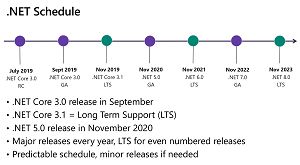 [Click on image for larger view.] The .NET Schedule (source: Microsoft).
Microsoft "strongly" recommends migrating applications to .NET 6. Doing so involves searching local machines to update development environments by removing any .NET 5 installations, after which a developer can:
- Open the project file (the .csproj, .vbproj or *.fsproj file).
- Change the target framework value from net5.0 to net6.0. The target framework is defined by the or element.
- For example, change net5.0 to net6.0. You may also want to review the .NET 6 Compatibility Guide.
That latter tool is advised because it helps developers find things that may get broken in an upgrade.
Also, regarding those .NET 5 machine implementations, developers should be aware of some changes that might come if .NET 5 is installed with Visual Studio 2019 16.11 or 16.9 or 16.7, depending upon the installed workloads.
"Starting with the June 2022 servicing update for Visual Studio 2019 16.11 and Visual Studio 2019 16.9, the .NET 5.0 component in Visual Studio will be changed to out of support and optional," Microsoft said in a March 24 post. "This means that workloads in Visual Studio may be installed without installing .NET 5.0. Note that existing installations won't be affected and any previously installed workload and component will remain installed until the component or workload is unselected in Visual Studio setup. While it's possible for you to re-select this optional component in Visual Studio and re-install this, we strongly recommend you use .NET 6.0 with Visual Studio 2022 to build apps that run on a supported .NET runtime."
About the Author
David Ramel is an editor and writer at Converge 360.