News
Visual Studio 2022 Preview Allows Code Editing in Search Results
In the latest Visual Studio 2022 preview, developers can edit source code from within All-In-One Search results.
That's the latest search improvement from the dev team, which in April revamped the IDE's search experience in a VS 2022 v17.2 preview that introduced All-In-One Search, providing a one-stop-shop, lightweight, customizable and easily dismissible search popup, which can be kept open and even moved to another monitor for an easier searching/coding experience.
"The new search experience includes a symbol search for looking up file names, types (including classes, interfaces, enums, and types), and members (methods and properties within a class) as well as a feature search to look up Visual Studio related functionalities," Microsof said at the time. "You can enjoy a real-time, instant response search experience with a customizable (size, location, and dismissibility) and fully keyboard friendly UI."
In VS 2022 v17.3 Preview 2, the new functionality comes via Contextual Code Previews, which lets developers preview and make edits to search results within the search popup, mimicking a full editor experience. For example, beyond making code changes, it helps developers differentiate between similarly named symbols and leverage editor features like "Find all references."
"The additional context provided by the code preview will allow you to differentiate between search results within seconds, making it easier than ever to find exactly what you're looking for," said Denizhan Yigitbas, product manager, in a June 27 blog post. "With the ability to edit code right from the search window, you'll be able to stay focused on your code and quickly make changes using the same experience you've come to know and love in the full Visual Studio editor. You'll find full support for IntelliSense, Quick Actions, refactorings, and more without ever needing to leave the search UI."
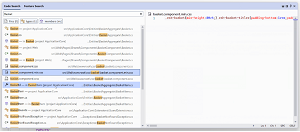 [Click on image for larger, animated GIF view.] Editing Search Results in Animated Action (source: Microsoft).
Customization of the UI display is also available, as developers can toggle among icons displayed at the top of the search window to have results displayed above the code in a vertical configuration or to the right of the code in a horizontal configuration. A third option disables the code previews completely.
The new search experience can be enabled from the top menu: Tools > Options > Environment > Preview Features > New Visual Studio Search Experience.
We put the new All-In-One Search functionality through its paces in last week's Visual Studio Magazine article "Hands On with Latest Visual Studio 2022 Preview Features," along with audio cues.
About the Author
David Ramel is an editor and writer at Converge 360.