News
Microsoft Agent Framework Makeover: Claws, Loops and Harnesses
A new "batteries-included" approach to building AI agents has arrived with Microsoft's Agent Framework Harness, showing how advanced agentic AI development is evolving rapidly. New tech and techniques have given rise to new terms you might not have heard much about yet, like claw, harness, loop and more. This announcement will help get you up to speed about how this space is exploding and what all the new jargon means and how you do things these days.
The Agent Framework Harness is designed to turn a language model into an agent capable of planning work, invoking tools, retaining state and progressing through multi-step tasks. The company's Agent Framework itself is an open-source development offering for building, orchestrating and deploying AI agents and multi-agent workflows in .NET and Python.
Microsoft's July 22 announcement describes the harness as the surrounding runtime that supplies the operational machinery a language model needs to do more than generate a response.
"An agent harness is the scaffolding that turns a language model into an agent," said Microsoft's Wes Steyn.
That scaffolding includes the agent's tool-calling loop, planning system, conversation history, persistent memory, context-window management, approval rules and telemetry. Developers supply a chat client, instructions and optional custom tools, while the harness configures the rest of the agentic pipeline with defaults that can be replaced or disabled.
From Model to Agent
A language model ordinarily receives input and generates output. Even when a model supports function calling, an application still needs code that presents the available tools, receives the model's requested tool call, executes it, returns the result and asks the model what to do next.
That repeated model-tool interaction is generally called an agent loop:
User request
    |
Call model with instructions, context and tools
    |
Model returns an answer or requests a tool
    |
Execute or approve the tool
    |
Return the result to the model
    |
Repeat until the task is complete
The loop is the repeating behavioral mechanism at the center of an agent. The harness is the broader runtime that operates and governs that loop.
In addition to calling the model and routing its tool requests, a production-oriented harness may need to preserve state after every model call, prevent the growing history from exceeding the context window, maintain a task list, request permission before sensitive actions, recover from interrupted runs and record traces developers can inspect afterward.
The newly released harness supplies those capabilities as a predefined Agent Framework configuration rather than requiring developers to select and connect every component separately.
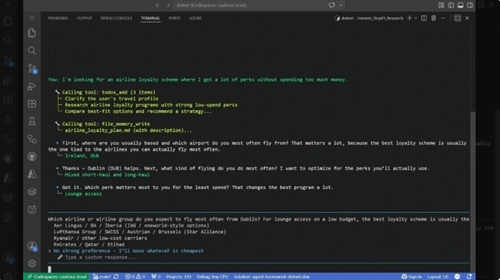 [Click on image for larger, animated GIF view.] Agent Harness in Animated Action (source: Microsoft).
How Agents Worked Before the Harness
The release does not introduce agent loops or tool calling. Developers have long been able to build them directly or use components from Semantic Kernel, AutoGen and the underlying Microsoft Agent Framework.
Microsoft Agent Framework itself was introduced as the successor to Microsoft's earlier agent development technologies, combining the enterprise-oriented foundations of Semantic Kernel with multi-agent concepts developed through AutoGen. Its components already made it possible to create agents, tools, workflows, context providers, middleware and orchestration patterns.
Before the packaged harness, however, developers generally had to decide which of those pieces an agent needed and compose them into an application. A production-capable implementation could require separate work to:
- Implement or configure the model and function-calling loop.
- Register tools and route tool calls to application code.
- Persist conversation history and task state.
- Implement retries, iteration limits and termination conditions.
- Compact or summarize history before the context window filled.
- Add a planner, task list or plan-versus-execute workflow.
- Store durable notes and artifacts between interactions.
- Place approval checks around sensitive tools.
- Add logs, traces, metrics and cost telemetry.
Those components collectively formed a harness whether or not the application used that name. Terms such as runtime, orchestration layer, controller and agent executor have also been used for overlapping parts of the same architecture.
The Microsoft harness addresses that assembly burden by shipping a curated combination of existing Agent Framework features. Internally, Microsoft says, it remains a standard Python Agent or .NET ChatClientAgent with a selected collection of framework capabilities attached.
Developers are therefore not locked into a separate agent type with an inaccessible implementation. The bundled capabilities are also available individually, and the harness exposes settings for disabling or replacing its defaults.
What the Harness Includes
According to the accompanying Agent Framework documentation, the harness brings the following pieces into one agent pipeline:
| Capability |
What It Does |
| Function invocation |
Runs the automatic loop that calls the model, executes requested tools and returns their results, subject to a configurable iteration limit. |
| History persistence |
Saves chat history after individual model calls, supporting mid-run inspection and recovery after an interrupted process. |
| Context compaction |
Reduces or restructures accumulated context so long-running tool loops do not exceed the model's context window. |
| Todo provider |
Maintains a persistent task list for work that must be divided into multiple steps. |
| Agent modes |
Tracks plan, execute or custom operating modes that determine how autonomously the agent proceeds. |
| File memory |
Stores session notes and artifacts that can survive across turns. |
| Skills |
Discovers packaged domain instructions and progressively loads them when relevant rather than placing all instructions in the initial prompt. |
| Web search |
Adds hosted web search when the underlying inference service supports it. |
| Tool approval |
Supports approval prompts, standing "don't ask again" decisions and heuristic approval of calls considered safe. |
| OpenTelemetry |
Provides tracing and observability based on generative AI semantic conventions. |
Most of those capabilities are enabled by default, although some require additional configuration. Context compaction, for example, becomes active when developers supply a token budget or custom compaction strategy. Hosted web search also depends on the selected model service supporting the feature.
Creating a Harness Agent
For .NET developers, the simplest path starts with an implementation of the IChatClient interface. That client can then be converted into a harness-backed agent with the AsHarnessAgent extension method:
AIAgent agent = chatClient.AsHarnessAgent(
    new HarnessAgentOptions
    {
        ChatOptions = new ChatOptions
        {
            Instructions =
                "You are a research assistant. Plan your work, then execute it.",
            Tools = [/* custom tools */],
        },
    });

AgentRunResponse response =
    await agent.RunAsync("Research recent developments in quantum computing.");
Python developers use the create_harness_agent factory:
agent = create_harness_agent(
    client=client,
    agent_instructions=(
        "You are a research assistant. "
        "Plan your work, then execute it."
    ),
    tools=[],
)

response = await agent.run(
    "Research recent developments in quantum computing."
)
Microsoft said those calls automatically add function invocation, persistent history, task planning, context management, approvals, web search and telemetry. Developers primarily define the agent's purpose and any application-specific tools it needs.
What Developers Can Do with It
Microsoft highlighted three broad categories of agents that can be created from the released harness: autonomous research assistants, data-processing agents and persistent domain assistants.
Research assistants can receive a broad assignment, convert it into a todo list, switch from planning into execution, search current information and work through the resulting tasks. The history and compaction components are intended to let that work continue across many model and tool calls without losing the task plan or overflowing the context window.
In plan mode, an agent can ask questions and propose a todo list before performing significant work. In execute mode, it can proceed through those approved tasks more independently while reporting its progress.
Data-processing agents can inspect and analyze collections of documents using file tools placed behind approval controls. Microsoft gives the example of an agent reading a folder of files, analyzing the contents and writing results while requiring authorization for actions considered sensitive.
The approach separates an agent's reasoning from its authority. A model may decide that editing, moving or transmitting a file is useful, but the harness can require a person to approve the corresponding tool call before it is executed.
Domain assistants can combine custom business tools, memory, task planning and progressively loaded skills. Rather than including every policy and procedure in one large system prompt, developers can package specialized instructions in SKILL.md files that the agent discovers and loads when a request matches their descriptions.
Microsoft's example is a personal-finance assistant that can retrieve stock information, read a portfolio, prepare reports and perform analyses. The company refers to that persistent, command-line-style assistant as a "claw."
How 'Claws,' Harnesses and Loops Relate
Microsoft's terminology reflects several layers of an agent system rather than three names for the same thing.
- The model interprets the context and decides what response or action should come next.
- The loop repeatedly invokes the model, executes tools and supplies the resulting observations.
- The harness surrounds that loop with planning, memory, context management, permissions and observability.
- A claw, in Microsoft's current usage, is a capable agent experience built from the model and harness, typically with persistent tools, data and an interactive command-line interface.
Microsoft summarized that relationship in its Build Your Own Claw series, stating that a claw is fundamentally a model plus a harness that provides tools, planning, memory, approvals, observability and deployment infrastructure.
"Claw" is therefore not another low-level execution primitive comparable to a loop. It describes the more complete assistant created from those lower-level components.
Why Harnesses and Loops Are Showing Up Now
The concepts behind agent loops are not new, but the terms have become much more prominent as AI products have moved beyond single-turn chat and basic function calls.
Modern coding and task agents may operate for extended periods, access external systems, edit files, execute commands, delegate work and preserve state across multiple context windows. That makes the quality of the surrounding runtime increasingly important.
Microsoft also attributes the emergence of "claw"-style agents to improvements in the models themselves. In its harness tutorial series, the company said recent models have become better at following layered instructions, reliably selecting tools, operating within longer context windows and reasoning through multi-step assignments.
A harness cannot make an incapable model reliably perform those tasks, but it can organize and constrain the way a capable model operates. As multiple products gain access to similarly powerful models, their behavior can increasingly depend on differences in their harnesses: the tools supplied, instructions injected, context retained, approval rules enforced and loops used to recover from incomplete work.
Skills, Shells, Code and Background Agents
Microsoft has already demonstrated ways to extend the core harness beyond its default configuration.
In the latest installment of its claw series, the company showed an agent progressively loading skills, using an approval-gated shell to reorganize files, writing and executing code through CodeAct, and delegating research tasks to parallel background agents.
The shell integration can be confined to a specified working directory and configured with policies that reject known destructive commands. Microsoft cautioned, however, that a command deny list is not a security boundary. Untrusted operations require real isolation, such as a sandboxed executor.
CodeAct support gives an agent an isolated interpreter in which it can generate and run code. That can be preferable to asking the model to perform calculations mentally, because the resulting code and output can be examined.
Background agents allow a primary agent to divide a task into independent units, start specialized subagents concurrently and collect their results. That can reduce elapsed time and keep large amounts of intermediate research out of the main agent's immediate context.
Core Release vs. Opt-In Features
Microsoft said the core harness is now released, but several advanced capabilities have not reached the same status.
Background agents, general file access, shell tooling and automatic looping remain available as opt-in features. Developers can use them, but Agent Framework displays a warning because Microsoft is continuing to collect feedback and refine their behavior.
The separate automatic looping feature should not be confused with the core function-calling loop.
The function-calling loop lets the model request multiple tools during a single agent run. The optional outer loop can re-invoke the entire agent after a run ends until a completion evaluator determines that the larger assignment is finished. A completion marker, remaining todo items, an application predicate or an AI judge can serve as that stopping condition.
Thus, a harness can contain more than one level of looping:
Outer completion loop
    |
    +-- Agent run
          |
          +-- Model and tool-calling loop
          +-- Planning and todo updates
          +-- Approval checks
          +-- History persistence
          +-- Telemetry
    |
Evaluate whether the overall task is complete
Because every outer iteration can involve a complete set of model calls and tool operations, Microsoft provides controls for iteration limits and completion conditions.
Customizable Rather Than All-or-Nothing
The harness is opinionated, but Microsoft does not require developers to accept the entire configuration.
Options are provided for disabling the todo system, plan-and-execute modes, hosted web search, file memory, file access, automatic tool approval, skills, context compaction and OpenTelemetry. Developers can also supply their own context providers, instructions, approval strategies and memory implementations.
That lets teams use the harness as either an application runtime or a reference implementation showing how Agent Framework's lower-level components can be assembled.
The release also does not remove the broader work required to deploy an agent safely. Developers must still select a suitable model, design tools with limited authority, protect credentials, isolate risky execution, evaluate results and build the user experience through which approvals and progress are presented.
What the harness changes is the starting point. Instead of beginning with a model client and individually constructing all of the surrounding agent machinery, .NET and Python developers can begin with Microsoft's predefined pipeline and concentrate first on the agent's instructions, tools and intended job.