News
AWS Streamlines .NET App Deployment with Visual Studio Tool
Amazon Web Services (AWS) has made it easier to deploy .NET applications to its cloud platform via its Visual Studio toolkit or the .NET CLI (command-line interface).
From within the Visual Studio IDE, the smoother deployment process comes with a new "Publish to AWS" wizard in the AWS Toolkit for Visual Studio 2022 in the Visual Studio Marketplace, which has been installed more than 45,000 times.
It's described as "an extension for Microsoft Visual Studio on Windows that makes it easier for developers to develop, debug and deploy .NET applications using Amazon Web Services."
The kit's description further reads: "The AWS Toolkit provides Visual Studio project templates that you can use as starting points for AWS console and web applications. As your application runs, you can use the AWS Explorer to view the AWS resources used by the application. For example, if your application creates buckets in Amazon S3, you can use AWS Explorer to view those buckets and their contents. If you need to provision AWS resources for your application, you can create them manually using the AWS Explorer or use the CloudFormation templates included with the AWS Toolkit to provision web application environments hosted on Amazon EC2."
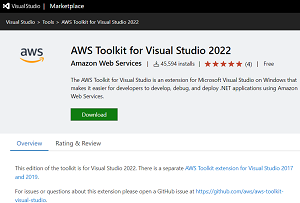 [Click on image for larger view.] AWS Toolkit for Visual Studio (source: AWS).
For working with the .NET CLI, the functionality comes with the AWS Deploy Tool for .NET NuGet package.
"With sensible defaults for all deployment settings, you can now get your .NET application up and running in just one click, or with a few easy steps -- without needing deep expertise in AWS," Amazon said in a July 6 blog post. "You will receive recommendations on the optimal compute for your application, giving you more confidence in your initial deployments."
Indeed, those compute recommendations top the list of key capabilities as presented by AWS:
- Compute recommendations for your application -- Get recommendations about the type of compute best suited for your application based on the application type.
- Dockerfile generation -- The tool will generate a Dockerfile if needed, otherwise an existing Dockerfile will be used.
- Auto packaging and deployment -- The tool builds the deployment artifacts, generates a deployment CDK project, provisions the infrastructure and deploys your application to the chosen AWS compute.
- Repeatable and shareable deployments -- The tool persists configuration settings and AWS Cloud Development Kit (CDK) project used to deploy your application. You can also version control them and share with other team members for repeatable deployments.
- Help with learning AWS CDK for .NET! -- Once you are ready to start exploring, the deployment tool will help you gradually learn AWS tools like CDK that are used under the hood. It generates well documented/organized CDK projects that you can easily start modifying to fit your specific use-case.
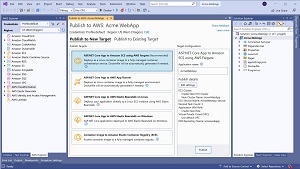 [Click on image for larger view.] Publish to AWS (source: AWS).
Several types of applications can be deployed (though not .NET Lambda functions), including:
- ASP.NET Core applications
- Blazor WebAssembly applications that are built with .NET Core 3.1 and above including the .NET 7 preview
- .NET Console applications, including long-running services for message processing and so on
- Scheduled tasks
As far as deployment targets, at this stage the new experience can work with Amazon Elastic Container Service (Amazon ECS) using AWS Fargate compute engine, AWS App Runner and AWS Elastic Beanstalk. Also supported is hosting Blazor WebAssembly applications in Amazon S3 using Amazon CloudFront as a content delivery network (CDN).
"The new deployment experience focuses on the type of application you want to deploy instead of individual AWS services by providing intelligent compute recommendations," AWS said in a separate July 6 post.
"One of the major new features is deployment projects. This new concept lets you customize deployments inside Visual Studio or the CLI, including the UI, and share it with the rest of your team members. Deployment projects allow teams to come up with custom deployment scenarios and still provide their team with interactive or scriptable deployments."
Meanwhile, the old deployment experiences -- "Publish to AWS Elastic Beanstalk" and "Publish Container to AWS" -- are still available in the the toolkit, though they're marked as Legacy in the context menu. AWS won't extend those wizards in the future and thus recommends that toolkit users migrate to the new "Publish to AWS" wizard. Developers are invited to open an issue on GitHub" for feedback, such as reporting missing features that are blocking migrations.
More information can be found in "Working with Publish to AWS in Visual Studio" documentation.
About the Author
David Ramel is an editor and writer at Converge 360.