News
Visual Studio Devs Can Now Roll Back Problematic Updates
Addressing a longstanding developer request, Microsoft has made it easier to roll back problematic IDE updates in the new Visual Studio 2022 17.4 Preview 2.
As we earlier this year explained in the Visual Studio Magazine article, "Top 'On Roadmap' Feature Request for Visual Studio 2022: Roll Back Updates," the top open feature request that had been advanced to On Roadmap status on Microsoft's Developer Community site -- in terms of votes -- was filed in November 2018 by Staffan Tjernström, who asked Microsoft to "Introduce the ability to roll back a Visual Studio Update." It reads in part: "there is a definite need for the ability to roll back a visual studio release, or to lock a visual studio sub-release at a given version."
Almost four years later, that item, which garnered 432 votes and 189 comments, is now available in v17.4 preview 2, Microsoft said last week. The functionality was actually introduced in Preview 1, as Microsoft set up a Developer Community site to collect "Feedback on the rollback feature introduced in VS 2022 version 17.4 P1." That item has garnered 14 comments.
Similar Developer Community bug/feature request items enacted in Preview 2 include several that build on recently introduced support for the Arm64 CPU architecture, which was boosted in the previous preview as explained in the article, "Visual Studio 2022 17.4 Preview 1 Furthers Arm64 Support."
In Preview 2, that Arm64 support is extended with these items:
"We have made significant progress bringing additional components and workloads to the native Arm64 Visual Studio experience," Microsoft's Marc Goodner said in a Sept. 14 announcement post. "This includes the highly anticipated native performance improvements for the Windows SDK (includes Win UI 2 and UWP) as well as support for Win App SDK (Win UI 3)!"
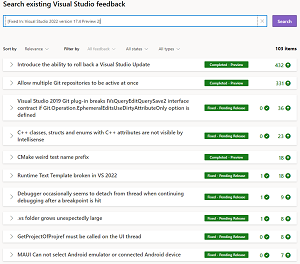 [Click on image for larger view.] Visual Studio 2022 17.4 Preview 2 Updates (source: Microsoft).
Many other Developer Community requests were also addressed in Preview 2 (as shown in the above graphic), including:
Other updates in Preview 2 affect collaboration and Microsoft Teams, productivity, .NET improvements and much more.
The Preview 2 release notes provide more information on all of the above and much more.
About the Author
David Ramel is an editor and writer at Converge 360.