News
Ignite 2022 Showcases Visual Studio for Cloud, Collaborative Development
The days of a single developer sitting in an office while using desktop Visual Studio to code a monolithic enterprise app are waning. Now it's all about the cloud and collaboration, Microsoft emphasized at the start of its big Ignite 2022 conference.
Not that this is a new thing, as the company has been beating the cloud/collaboration drum for many years now.
But the increased attention to cloud-based, distributed, remote teams is reinforced at Ignite 2022 in several ways, including the Visual Studio IDE being put to new uses.
Visual Studio VM Images in the Azure Marketplace Now Support Microsoft Dev Box
Microsoft Dev Box, a managed service providing developer-oriented, Azure-based cloud workstations, was announced in a private preview in May and just unveiled in a public preview in August.
It lets developers create on-demand, secure, high-performance, ready-to-code, project-specific workstations in the cloud, freeing them to concentrate on coding rather than setup and configuration, according to Microsoft. Users can choose from different SKUs that offer various amounts of compute, storage and other resources.
Microsoft last week introduced Visual Studio virtual machine (VM) images for the
Azure Marketplace, optimized for running Visual Studio in standalone VM instances, with
Azure Virtual Desktop or the recently announced
Microsoft Dev Box service. "These images have proven to be popular not only for evaluating the latest Visual Studio releases, but also for jumpstarting developer environments in the cloud," the company
said in advance of Ignite 2022.
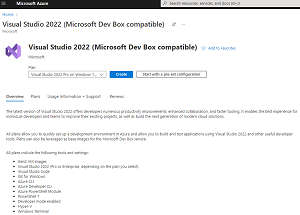 [Click on image for larger view.] Visual Studio 2022 VM Image (Microsoft Dev Box Compatible) (source: Microsoft).
As the above screenshot shows, the VMs come with a variety of tools and settings, but only for Pro or Enterprise VS editions, not the free Community edition.
The VS VMs were also featured in Microsoft's "Book of News," which it publishes to encapsulate all announcements at big shows. That Ignite 2022 book says: "Rigid workstations often limit developer productivity. Getting set up with these resources requires support from admin teams and stretching them across hybrid workspaces can result in security vulnerabilities. Microsoft Dev Box, a new service introduced at Microsoft Build 2022, provides developers with self-service access to high-performance, cloud-based workstations preconfigured and ready-to-code for specific projects.
"Visual Studio images for Dev Box are now generally available on Azure Marketplace. These ready-to-use images ensure developers can be productive as soon as they create a Dev Box by leveraging commonly used Visual Studio functionalities as well as complimentary tools."
Azure Deployment Environments Preview
As Ignite 2022 kicked off, Microsoft announced a public preview of Azure Deployment Environments, described as a managed service that helps dev teams quickly spin up app infrastructure with project-based templates, thus establishing consistency and best practices while maximizing security, compliance and cost-efficiency.
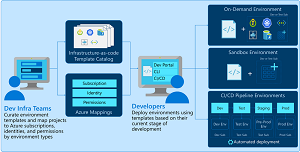 [Click on image for larger view.] Azure Deployment Environments (source: Microsoft).
"With Azure Deployment Environments, developers can deploy the right environment at the right time without worrying about backend processes," Microsoft said. "Azure Deployment Environments integrates with established CI/CD pipelines, making it easy to see how code changes impact app performance. Set up a new dev environment to deploy with each feature branch to see how your changes work in a production-like environment, or use dev environments when creating pull requests for higher quality code reviews.
"Developers can also deploy on-demand and sandbox environments for experimentation and PoCs directly from where they work—whether from the CLI or a custom developer portal. Because the templates are grouped by projects, developers can quickly pick and provision the right environment and get back to coding and testing their applications without having to think through the intricacies of creating the environment for their project."
Teams Toolkit for Visual Studio
When talking about collaboration in the Microsoft world, of course, Microsoft Teams is front and center. As Ignite 2022 kicked off, Microsoft announced that the Teams Toolkit for Visual Studio is now generally available, though the company made the same exact announcement in early August.
Brand-new or not, there are now Teams toolkits for the Visual Studio IDE and the Visual Studio Code editor.
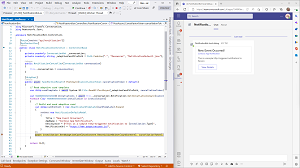 [Click on image for larger view.] Teams Toolkit for Visual Studio (source: Microsoft).
"Earlier this year, we announced the general availability of Teams Toolkit for Visual Studio Code, our source code editor for JavaScript and Web developers. Today we're pleased to announce to all the .NET developers out there that Teams Toolkit for Visual Studio is also generally available," Microsoft said in an Oct. 12 post.
"One of the most exciting items included in Teams Toolkit is the Teams JS SDK 2.0 and Teams 1.14 manifest. This makes it possible to build Teams pages and message extension apps that can extend to Outlook and Microsoft 365 apps -- without making any code changes. What's more, we're pleased to announce that we've started to roll out the public preview of functionality that extends these same
Teams apps to Android devices. Availability is starting with participants in the Office Insiders program who have Office Mobile for Android from the Beta Channel."
More to Come
As most of the above was unveiled on the first day of Ignite 2022, we can expect much more news about cloud-based and collaborative development, along with Microsoft's low-code push with offerings like the Power Platform and Power Apps. For example, later today there's a session titled "From low code to pro code: building and buying collaborative apps to power an evolving workplace." So stay tuned for more.
About the Author
David Ramel is an editor and writer at Converge 360.