News
Visual Studio 'Port Forwarding' Now 'Dev Tunnels,' So What's a Dev Tunnel?
A private preview of Visual Studio port forwarding in ASP.NET Core web-dev projects has turned into a public preview of dev tunnels, Microsoft announced this week. So what's a dev tunnel?
Dev tunnels, or port forwarding, or port tunneling (Microsoft uses all three terms) enables ad-hoc connections between machines that can't directly connect to each other, company documentation says.
In simple terms, it lets remote computers on a public system such as the internet connect to devices or services on private networks, or vice-versa.
The company introduced a private preview of port tunneling in Visual Studio for ASP.NET Core projects in May with VS 2022 17.3 Preview 1.1, at the time listing a few example use cases:
- Developing an API that is consumed by Power Platform.
- Developing a web hook for an external service (web hooks allow for automatic communication between apps, sometimes in response to events such as a payment made over the web)
- Testing a web app on an external device
This week, Microsoft announced a public preview of dev tunnels in Visual Studio, following the private preview, saying the main difference between the private preview and the public preview is that devs no longer need to sign-up and be approved to access dev tunnels.
Thus developers can take part by downloading the latest iteration of the company's flagship IDE, Visual Studio 17.4, and enabling the functionality by checking the appropriate box via the menu: Tools->Options->Environment-Preview Features:
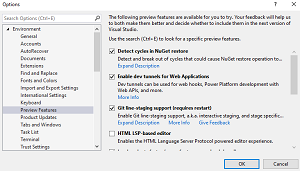 [Click on image for larger view.] Enabling Dev Tunnels Preview (source: David Ramel).
After that enablement, some configuration is needed in launchSettings.json.
"After configuring dev tunnels in launchSettings.json, your project will start locally, and a public URL will be associated with your project," Microsoft said. "You can use this public URL to access the project outside of your local machine. Some scenarios where you may want to use a public URL include; developing web hooks, developing a Power Platform app that calls into an ASP.NET Core Web API, sharing your in-progress work and more. For the current implementation, each time you start Visual Studio, you will get a new URL, but we are exploring ways that we can maintain the same URL across restarts to Visual Studio. We will have more to share there in the future."
Many improvements have been made since the initial release, including the ability to attach a dev tunnel to an Azure Functions project, used for serverless computing in Microsoft's cloud computing platform.
Other improvements include: a new Output Window that displays the status of a tunnel; changing the default tunnel access to be private instead of public in order to improve security; new account types (Microsoft Account and GitHub); and the ability to expose a tunnel URL via Environment Variable.
Going forward, the dev team previewed what's coming for the project.
"The current model for dev tunnels support requires users to write values into the launchSettings.json file," the post said. "We have run into a number of issues with this model and we will be removing that in a future release. Instead we will build some UI into Visual Studio which will enable you to create and manage tunnels more explicitly."
As part of that effort, the team hopes to enable these features:
- Ability to configure a tunnel to use a durable URL or a temporary URL. A durable URL means that the same URL should be used even after Visual Studio is restarted.
- Create tunnels on different accounts.
- Mange tunnel settings.
- Select a tunnel to be used.
- UI to show the current dev tunnels URL.
- UI to get a Tunnel Access Token.
- Automatically create a custom connector on the Microsoft Power Platform side based on a dev tunnels URL.
About the Author
David Ramel is an editor and writer at Converge 360.