News
Visual Studio 2022 v17.5 Preview 2: Guided by Developer Community Votes
If you want a sneak peek at what new goodies are coming for your favorite IDE, the Visual Studio section of Microsoft's Developer Community feedback site is a good place to start, chock full of bug reports and feature requests that help guide the dev team.
For example, Visual Studio 2022 v17.5 Preview 1, released last month along with the GA release of VS 2022 v17.4, addressed a whopping 59 feedback items, ranging from "Use Regex to specify color scheme for colored tabs" to "CSHTML formats code with spaces instead of tabs" and much more. The former was the most popular, garnering 63 votes.
As far as the most popular Developer Community items that have been completed and released overall, here are the top vote-getters.
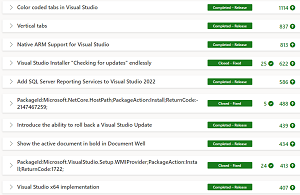 [Click on image for larger view.] Top Completed Items Overall (source: Microsoft).
Continuing the dev team's mantra of "Developer Community Suggestions: You asked, we listened!" Microsoft today (Dec. 13) shipped VS 2022 v17.5 Preview 2, featuring these Developer Community highlights:
Note that while it might take several years for Developer Community items to make it into the IDE (the second item in the above list was posted in early 2019), the dev team seems to try to abide by that mantra.
"This release is packed with new capabilities across the IDE, .NET, C++ and Setup," Microsoft's announcement said. "There is something in this release for everyone. Many of these tackle top asks you've voted for on Developer Community."
Thus the announcement post doesn't highlight any game-changing new features or other items of special importance, rather being a list of tweaks and fixes across several areas. C++ development seemed to be the area that received the most attention (14 items), with other counts being: IDE (6 items); .NET (three items); and Setup and Updates (two items).
Take, for just one example, All-In-One Search for finding symbols in code, IDE features, files and more, introduced in April.
"The new search experience makes it easy for you to quickly find a Visual Studio menu feature files, types, and members in your code all from one place," today's post said. "We have made significant improvements to the ordering and relevancy of results in our code search. We also removed the limit to the number of results provided in the results list without compromising speed."
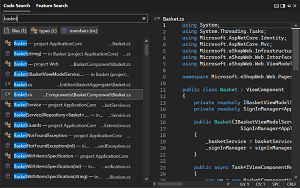 [Click on image for larger view.] All-In-One Search in Animated Action (source: Microsoft).
What's more, a new Preview Panel in code search supports code results for both C# and C++. Default functionality for this new preview automatically indicates when a search is performed so developes can can immediately see the context of the selected result.
All-In-One Search is enabled by a menu command: Tools > Manage Preview Features > "New Visual Studio Search experience (restart required)."
For further information on things coming up, the Visual Studio 2022 Roadmap provides a lot of high-level, general information about the IDE's editor, diagnostics, personalization, extensibility, IntelliCode, NuGet, Web Forms, Web Tools, XAML/Xamarin and much more centered around three key themes:
- Personal and Team productivity: we want to empower developers and teams with incredible scale and performance, a trusted and secure toolchain, and a more accessible, personalized environment.
- Modern Development: we are building the tools to develop modern apps faster.
- Constant Innovation: we are investing in improved collaboration, actionable diagnostics, and code assistance.
"As you use Visual Studio, let us know what you love, what you like, and where you'd like us to improve," Microsoft said today. "You can share feedback with us via Developer Community: report any bugs or issues via report a problem and share your suggestions for new features or improvements to existing ones."
About the Author
David Ramel is an editor and writer at Converge 360.