News
.NET 8 Preview 6 Bolsters New Blazor Rendering Schemes
Microsoft shipped .NET 8 Preview 6, bolstering the new rendering schemes for Blazor, the ASP.NET Core web-dev component that allows for primarily using C# instead of JavaScript.
Those rendering schemes include server-side rendering of components in Blazor Server and interactive rendering with Blazor WebAssembly, the client-side counterpart. They are part of a Blazor unification effort to enable using Blazor components for all web UI needs, stemming from work done by Blazor creator Steve Sanderson.
Today (July 11), Microsoft announced several work items relating to Blazor in .NET 8 Preview 6, including:
- Blazor's new server-side rendering mode can now model bind and validate HTTP form post values.
- Blazor streaming rendering will now preserve existing DOM elements when streaming updates into the page, which provides a faster and smoother user experience.
- Developers can now enable interactive rendering of components with Blazor WebAssembly.
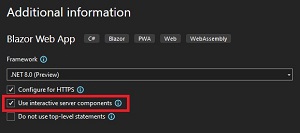 [Click on image for larger view.] Blazor Web App Template Option for Enabling Server Interactivity (source: Microsoft).
- Developers can now specify the render mode for a component instance using the
@rendermode directive attribute.
In fact, Blazor dominated the list of ASP.NET Core items in Preview 6, also getting enhanced page navigation and form handling, sections improvements and other work.
And, to further that unification effort, the team consolidated some templates.
"As part of unifying the various Blazor hosting models into a single model in .NET 8, we're also consolidating the number of Blazor project templates," said Daniel Roth, principal program manager for ASP.NET. "In this preview release we've removed the Blazor Server template and the 'ASP.NET Core hosted' option from the Blazor WebAssembly template. Both of these scenarios will be represented by options when using the new Blazor Web App template."
Other general ASP.NET Core work improved the startup debugging experience and eased the testing of metrics in apps, while also adding new counters and improving existing counters in yet another improvement to metrics support.
Roth also detailed improvements to API authoring, specifically complex form binding support in minimal APIs.
"In .NET 8 Preview 4 we expanded support for form binding in minimal APIs to handle certain form-based parameters without the need of the FromForm attribute," Roth said." This was limited to parameter types including IFormCollection, IFormFile, and IFormFileCollection. Minimal APIs now supports form-binding for more complex scenarios, including:
- Collections, like
List and Dictionary
- Complex types, like
Todo or Project"
In the Servers & Middleware section, the team introduced the ability to use a Redis backend for output caching, providing consistency between server nodes via a shared cache that outlives individual server processes.
Yet another improvement introduces HTTP.sys kernel response buffering. "You can now enable kernel-based response buffering when using HTTP.sys using the EnableKernelResponseBuffering option," Roth said. "This option can improve response times, particularly when writing large responses with lots of small writes to a client with high latency. In affected scenarios, this can drastically improve response times from minutes (or outright failure) to seconds."
Developers are invited to provide feedback on the preview in the GitHub repo.
About the Author
David Ramel is an editor and writer at Converge 360.