News
Visual Studio 2022 v17.8 Previews New IntelliTest
Microsoft is previewing new IntelliTest functionality in the upcoming Visual Studio 2022 v17.8, along with productivity features like creating pull requests more easily.
With Visual Studio 2022 v17.7 now GA, the dev team has already made progress on the next edition, including enhancing IntelliTest in Visual Studio 2022 v17.8 Preview 1.
"IntelliTest explores your .NET code to generate test suites with high code coverage," Microsoft said last week in the Preview 1 announcement. "Powered by the latest version of the Z3 problem solver, it generates a varied set of inputs (scoped to those that improve code coverage) that are then plugged into what we call parameterized unit tests for each of your methods. When you Generate Tests, you have the ability to select which tests you'd like to preserve into a test project that can serve as your regression suite. As your code is updated, you can rerun IntelliTest to keep the generated tests in sync with your code."
Developer Community feedback requesting more IntelliTest support was posted way back in the days of .NET Core and .NET Standard in the October 2018 post, "Add IntelliTest support for .NET Core/Standard," which at the time of this writing is categorized as "On Roadmap" and has garnered 258 upvotes and 86 comments.
While the feature is still being improved, it has been around for a long time, being included in Visual Studio 2015 Enterprise Edition and just now catching up to the 64-bit evolution started with VS 2022 in 2021.
"Previous implementations of this Enterprise Edition feature only supported code targeting .NET Framework and did not support x64 configuration," Microsoft said last week while explaining the updated version includes the following:
 [Click on image for larger view.] IntelliTest Options (source: Microsoft).
The preview feature needs to be enabled, after which developers can right click within a method and select "IntelliTest (Preview)" and either "Create Project" to create a project where your tests can be saved or "Generate Tests" to generate a set of tests to review and decide which ones to keep.
Productivity Features
VS 2022 v17.8 Preview 1 also includes several productivity features, led by another popular Developer Community item about adding reviewers to a GitHub pull request from within the IDE. The item "Create a pull request in Visual Studio with new Git UX" was posted in 2020 and has received even more upvotes -- 274 -- along with 61 comments.
Users can now add reviewers to their pull requests in Visual Studio for both Azure DevOps and GitHub.
"Try this out by clicking on the 'Create a Pull Request' link that appears on push, or by selecting Git > GitHub or Azure DevOps > New Pull Request from the top level menu. Then, navigate to the Reviewers section and search for the reviewers you'd like to add," Microsoft said.
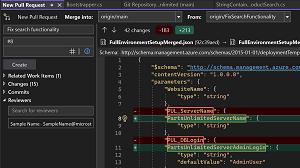 [Click on image for larger view.] Add Reviewers to Your Pull Request (source: Microsoft).
Other productivity features include:
- Summary Diff: "This new option allows you to see only the changes in the file with a few lines of context, making reviewing your changes in a commit or the comparison between two files much more efficient."
- Multi-Repo limit increase: "As more of you are using our Multi-repository features, many needed the number of active repositories to be more than 10. You can now work with up to 25 repositories at once in your solution."
- Case Preserving Find and Replace: "When you do a Replace, you can now preserve the original casing of each match in your code. Note that to get Pascal case and Camel case, your Replace string must be in Pascal case or Camel case."
The VS 2022 v17.8 Preview 1 post also details work on: C++ and game development; debugging and diagnostics; Razor tooling; and JavaScript and TypeScript development.
Additional information about all of the above and more is available in the release notes.
About the Author
David Ramel is an editor and writer at Converge 360.