News
VS Code Tool for Microsoft Teams Sports New Chat Bot App Template
Because AI hasn't quite yet been infused into every single Microsoft product and service, the company today announced a new AI chat bot template for its Teams Toolkit for Visual Studio Code.
Microsoft today announced the chat bot template as the major improvement in the regular monthly update to VS Code's Teams Toolkit, which also gets a new "One Productivity Hub" to showcase how to craft a tab that seamlessly displays calendar events, to-do tasks and files using Graph Toolkit with SPFx. Microsoft Graph Toolkit (MGT) is a collection of reusable web components powered by Microsoft Graph that help developers integrate Microsoft 365 services into their applications.
But it's AI, of course, that takes center stage in seemingly every Microsoft announcement these days.
The new AI chat bot template, fittingly used to create chatbots for Teams, hooks in to the company's Teams AI library, currently in public developer preview. It's a Teams-centric interface to GPT-based common language models like those that power OpenAI's ChatGPT and many Microsoft wares. It improves the process of building conversational bots for Microsoft Teams interaction by simplifying the complex and expensive tasks of writing and maintaining conversational bot logic to integrate with large language models (LLMs).
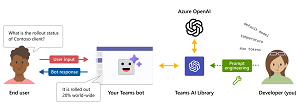 [Click on image for larger view.] Teams AI Library (source: Microsoft).
"We're thrilled to introduce the new AI chat bot app template, designed to kickstart your journey building sophisticated chat bots with AI capabilities using the Teams AI Library," Microsoft said in an Aug. 21 announcement. "This template empowers you to create GPT-like chat bots that can engage and interact intelligently with users."
The library helps devs do that with:
- Simple Teams-centric component scaffolding
- Natural language modeling
- Prompt engineering
- Predictive engine for mapping intents to actions
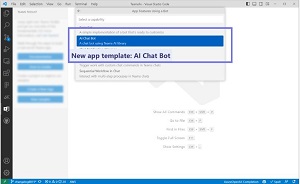 [Click on image for larger, animated GIF view.] Teams Chatbot in Animated Action: 'What Can You Do?' (source: Microsoft).
Along with the chat bot template and One Productivity Hub sample, the Teams team enhanced teamsapp.yml with CodeLens, made several tweaks to the Teams Toolkit CLI and TeamsFx SDK and fixed bugs, in addition to other work.
About the Author
David Ramel is an editor and writer at Converge 360.