News
Uno Platform 5.0: C# Is Now All You Need
Uno Platform 5.0 shipped this week with the ability to create entire cross-platform applications -- including markup -- from a single codebase written in one language, C#.
The open source Uno Platform claims to be the only offering that enables development of single-codebase applications for Windows, WebAssembly, iOS, macOS, Android and Linux, targeting all OSes and browsers. The Uno team has also teamed up with Redmond on various projects and has sometimes implemented new tech before Microsoft itself.
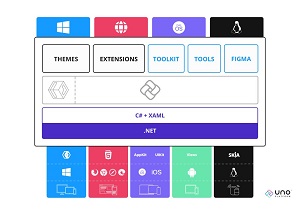 [Click on image for larger view.] Uno Platform (source: Uno Platform).
Version 5.0 shipped yesterday (Nov. 2), leveraging C# Markup for both front-end and back-end development. It lets developers use C# code for designing layouts instead of Microsoft's default markup language, XAML (Extensible Application Markup Language).
In announcing C# Markup for cross-platform .NET apps in v5.0, Uno Platform said, "You asked; we delivered. A massive bit of feedback from the community has been the need to learn multiple languages to build an Uno Platform application. Now, you can build your entire application using a single language with C# Markup!"
Microsoft C# Markup documentation shows that it's primarily associated with the company's .NET Multi-platform App UI (.NET MAUI) project. As C# Markup is not a new language, there are no extra types to know to build applications using it, said Uno Platform, which provided the graphic below to illustrate how similar is the markup code from C# Markup and XAML used to create the same UI elements:
 [Click on image for larger view.] C# Markup vs. XAML (source: Uno Platform).
A related new feature in v5.0 is what the team called the first and only Figma-to-C# Markup export tool, presented as a preview in the new release. "In addition to developing UI by hand using C# Markup, you can now generate C# Markup directly from Figma designs," the team said. "Our partners report a 5x productivity increase using this feature alone compared to coding by hand."
Other highlights of the new release as presented by Uno Platform include:
-
New and improved Hot Reload. Uno Platform said this functionality -- which has proven to be problematic for Microsoft -- works with XAML, C# or C# Markup in Visual Studio or Visual Studio Code on PC, Mac or Linux. The team said Hot Reload in Uno Platform 5.0 works in less than a second after the startup of an app, while also letting developers:
- Use all the newest supported C# code changes from .NET 8
- Get the state of controls preserved
- Update code-behind, add new event handlers, update styles, resources, bindings, x:Bind expressions, DataTempate, Resource Dictionaries and so on
- Improved MVUX (Model-View-Update eXtended) The team described this as "our implementation of the MVU pattern that allows you to get all the benefits of Reactive/Immutable/Declarative/Asynchronous state management while being fully testable and Hot Reload friendly."
- Two New Sample Apps with complete self-guided workshops to help developers learn how to build cross-platform applications using Uno Platform, reducing their ramp-up time. They are Simple Calc (beginner workshop) and Tube Player (intermediate workshop).
While the above constitute the major new features of the release, Uno Platform said the approximately 500 fixes and improvements across the offering also include:
- MP4 camera capture for iOS
- Improved composition support for Skia targets
- Many performance improvements for all platforms
- Improved DPI scaling and theming support for GTK
- Many Shapes clipping and general measure/arrange improvements
- Compass and MemoryManager support for WebAssembly
More information on all of the above can be found in the project's GitHub repo.
About the Author
David Ramel is an editor and writer at Converge 360.