News
New GitHub Copilot Chat AI Features Help Set the Intent: 'This Is the Future'
"I love it. This is the future."
That's how one developer reacted to new features for GitHub Copilot Chat, Microsoft's AI-powered coding assistant that comes via a Visual Studio extension.
That extension, nearing 220,000 installs as a free trial, was recently updated.
Microsoft-owned GitHub a month ago announced the general availability of the Chat tool for organizations and individuals. It improved on the original "AI pair programmer" by enhancing natural language capabilities. That, the company said, "enables the rise of natural language as the new universal programming language."
New features highlighted by Microsoft earlier this month include slash (/) commands and context variables, indicated with the # symbol.
Slash Commands
The slash commands can quickly modify code via different actions, including:
- /doc to add a documentation comment
- /explain to explain the code
- /fix to propose a fix for the problems in the selected code
- /generate to generate code to answer your question
- /help to get help on Copilot Chat
- /optimize to analyze and improve running time of the selected code
- /tests to create unit tests for the selected code
"Slash commands in Copilot Chat help you set the intent quickly for common development tasks," said new guidance titled "Get better answers by setting the context for GitHub Copilot Chat in Visual Studio."
"By using specific slash commands to form your question, you can get better answers without having to write out long questions," the company said.
Slash commands can be used in a chat window or directly from code. "Commands that help modify or add to the code file you have open in the editor will work both in the inline code assistant and the chat windows whereas commands for more general coding questions work only in the chat pane," Microsoft said, summarizing that in this table:
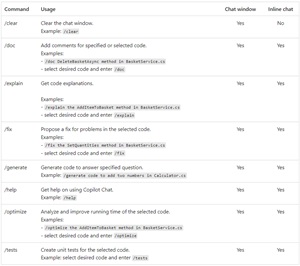 [Click on image for larger view.] Slash Commands (source: Microsoft).
Context Variables
The slash commands can be used with the new # context variables, which can help developers specify a file for Copilot to focus its answers on in response to submitted queries. Basically, they let developers add references to their code files into a query so the tool can access the file's content to answer more specific questions.
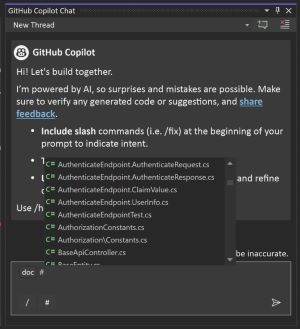 [Click on image for larger view.] Slash Commands & References (source: Microsoft).
"You can ask your coding related questions in natural language and GitHub Copilot Chat will answer these in the context of the codebase open in Visual Studio," Microsoft said. "With references you can get more specific about the information you want Copilot to consider when answering your question. By selecting a specific context in your codebase, you're able to form better questions easily without having to write out or paste long pieces of information. Specifying the context also enables Copilot to provide you with more relevant answers."
They can be used in conjunction with the slash commands, such as in these examples: "How does the #Main.cs file work?" or "What is the purpose of the #Calculator.cs file?"
About the Author
David Ramel is an editor and writer at Converge 360.