News
Microsoft Shares Copilot Prompts in New GitHub Repo (Contributions Welcomed)
Remember when "prompt engineer" job posts were listing salaries north of $300,000? Much has changed since then, and the "engineer" aspect has dimmed, with prompting advice, tools and resources freely available and abundant.
Microsoft has taken a step further in democratizing the prompt engineering field by sharing a collection of prompts for its various Copilots in a new GitHub repository. It's community-led and contributions are welcome, though you should be comfortable with your forking, branching, cloning and such.
Here's one example:
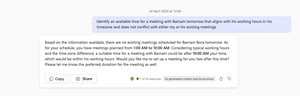 [Click on image for larger view.] Find Meeting Time with Another User (source: Microsoft).
The Copilot prompts repo was announced today (May 14), starting with 11 samples, in which meetings is a dominant theme (Microsoft Teams, anyone?). The other 10 samples (conveniently in the samples folder) are as follows at the time of this writing:
- Generate adaptive card using GitHub Copilot
 [Click on image for larger, animated GIF view.] Generate Adaptive Card Using GitHub Copilot in Animated Action (source: Microsoft).
- Locate unresponded meeting invitations
- Create meeting action items
- List meeting invitees for a meeting distinguishing internal and external invitees
- Locate my name mentioned in meetings
- Post meeting summary
- Summarize chat group discussions
- Create a Timeline of My Upcoming Meetings
- Create Annual Sales Report template
- Create an welcome slide to existing PowerPoint presentation
"This repo is a collection of prompts that will help you use the power of Microsoft Copilot across various application from Word to PowerPoint to Microsoft Teams, and more!" said Microsoft's Rabia Williams in the announcement. "This new GitHub repository is more than just a collection of prompts, it is there to get you ahead in the AI revolution. By contributing and utilizing these prompts, we can all push the boundaries of what's possible with Copilot. "
The repo invites contributions for great sample prompts for Microsoft Copilot, GitHub Copilot or Microsoft Copilot for Microsoft 365.
As noted, being familiar with GitHub repos helps enormously here, as Williams detailed this process for contributing your own prompts:
- Fork the repository: Go to the repository and select the Fork button to create your own copy.
- Create a new branch: Clone your forked repository and create a new branch with a unique name that reflects your prompt's purpose.
- Add a new folder: Inside the samples folder, create a new folder following the naming convention: <apphost-functionality-prompt>. For example, if you're creating a prompt for a PowerPoint sales report, name it ppt-sales-report-prompt.
- Prepare the readme file: Find an existing readme.md file in any sample folder. Copy it into the new folder you created in the step above and update the contents in the file to describe your prompt.
- Create an assets folder: Within your new folder, add a subfolder named assets. This is where you'll store any images or GIF files that your readme file refers to.
- Copy the sample JSON file: Locate the sample.json file in any existing sample's assets folder. Copy this file into your own assets folder.
- Update the JSON file: Modify the sample.json file in your assets folder to match the details of your prompt.
Williams further advised community contributors to create a pull request from their forked repos' new branch to the upstream repository's main branch so their prompts can be reviewed and approved by the community.
Would-be prompt contributors daunted by all of the above can also just open an issue and post an image and prompt, after which someone from the community can take care of putting it in the repo, providing full credit to the author.
About the Author
David Ramel is an editor and writer at Converge 360.