News
Microsoft Unifies Cloud and AI Development with .NET Aspire and AI Template Updates
Microsoft announced the availability of .NET Aspire 9.2 and the second preview of the .NET AI Chat Web App template, highlighting new capabilities that bring cloud-native orchestration and AI integration closer together in the .NET ecosystem.
.NET Aspire is an opinionated, cloud-native development stack for building distributed .NET applications with ease and consistency. It provides a streamlined way to develop, orchestrate, observe, and deploy multi-project .NET solutions -- particularly those involving microservices, cloud APIs, and containerized components.
Microsoft earlier this month announced .NET Aspire 9.2, touting new ways to deploy, specifically a new type of integration called publishers to help developers deploy .NET Aspire applications to more places.
Publishers allow developers to define how their applications are packaged and deployed across environments. This feature supports deployment to Docker Compose, Kubernetes, and Azure without requiring separate tools. Those publishers are in the preview stage in v9.2.
Also new is the .NET Aspire Resource Graph, which provides a visual representation of the resources in a .NET Aspire application. This helps developers understand the relationships between different components and how they interact with each other by displaying a graph of resources, linked by relationships.
Resource Graph in Action
Other new features and functionality include:
- Pause/Resume Telemetry: Buttons to halt log/metric collection temporarily.
- Metrics Health Warnings: Alerts when metrics exceed cardinality limits.
- UTC Timestamps: Optional UTC time in console logs.
- Custom Resource URLs: Define local domain mappings (e.g.,
https://mywebsite.local) in the AppHost.
- Resource Deep Linking: Direct integration with Azure Cosmos DB, Service Bus, Event Hubs, OpenAI, and Web PubSub for child-resource access.
- Custom HTTP Commands:
WithHttpCommand() API to trigger tasks like database seeding from the dashboard.
- Managed Identity Isolation: Individual identities for Azure Container Apps by default.
.NET AI Template Preview 2
Coincidentally, Microsoft's announcement of Preview 2 started out touting support for .NET Aspire.
"This update brings exciting new features, including support for .NET Aspire and integration with the Qdrant vector database when using .NET Aspire, making it even easier to create cloud-native AI-powered chat applications," said Microsoft's Jordan Matthiesen in an April 17
post. "Our .NET AI template continues to be part of our ongoing effort to simplify AI development with .NET by providing scaffolding and guidance within Visual Studio, Visual Studio Code, and the .NET CLI."
The .NET AI Template is a pre-configured project scaffold designed to simplify the creation of AI-powered chat applications using .NET, particularly those leveraging the Retrieval Augmented Generation (RAG) pattern. It provides a Blazor-based web app with built-in abstractions for AI services (via Microsoft.Extensions.AI) and vector data management (Microsoft.Extensions.VectorData), enabling developers to quickly integrate custom data sources like PDFs or databases. The template supports both local prototyping (with options like Ollama and local vector stores) and cloud deployments (via Azure OpenAI, Azure AI Search, and Qdrant), offering configuration flexibility.
Matthiesen said the second preview helps developers expand their development toolkit with .NET Aspire, enabling advanced AI capabilities and robust integration options.
He also detailed how to add .NET Aspire Orchestration: "The latest update to .NET AI templates introduces .NET Aspire Orchestration, enabling powerful, flexible integrations for both local and cloud-based AI models. By selecting 'Use .NET Aspire Orchestration' the template will create a new .NET Aspire solution including a .AppHost project that configures integrations for working with the various AI service & vector store providers."
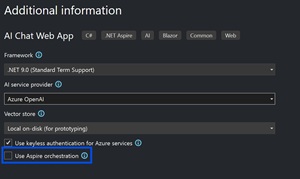 [Click on image for larger view.] Adding .NET Aspire Orchestration (source: Microsoft).
Other new features and functionality include:
- Qdrant Vector Database Integration: Support for the Qdrant vector database when using .NET Aspire, enabling efficient vector data storage and retrieval for AI-powered chat applications.
- VS Code Configuration Options: Added project configuration options in Visual Studio Code (with C# Dev Kit), including model provider and vector store selection during project creation.
- Ollama Local Model Hosting: Integration with Ollama via Docker for local AI model deployment, enabled through .NET Aspire orchestration and the OllamaSharp library.
- Azure OpenAI .NET Aspire Integration: Simplified connection to Azure OpenAI services using .NET Aspire's Azure OpenAI component for secure, cloud-based model access.
- Enhanced Semantic Search Options: Expanded vector store support including Azure AI Search and Qdrant, improving semantic search capabilities for custom data.
- Local Prototyping Improvements: Default local vector store configuration for faster experimentation, alongside Azure-ready production patterns.
- Containerized AI Workflows: Docker Compose support for Ollama models via .NET Aspire's container management features.
- Community Toolkit Extensions: Leverages the .NET Aspire Community Toolkit for Ollama integration, expanding open-source ecosystem compatibility.
About the Author
David Ramel is an editor and writer at Converge 360.