Q&A
Managing Change in a Microsoft World: Copilot Governance & Change Management
As Microsoft 365 Copilot continues to make its way into enterprise workflows, IT leaders are being asked to go beyond simply enabling access--they're being tasked with ensuring responsible use, sustainable adoption, and measurable business value. But with new tools come new challenges: How do you govern a generative AI assistant embedded across your productivity suite? How do you encourage adoption without overwhelming users already feeling "AI fatigue?" And how can you prove it's working?
These are the questions driving the session "Managing Change in a Microsoft World: Copilot Governance & Change Management," part of the Artificial Intelligence Live! track at Live! 360 in Orlando this November. The session, led by enterprise strategist Michelle Gilbert, explores a comprehensive, real-world approach to Copilot deployment, drawing on Microsoft's own adoption playbooks and governance tools.
 "Driving adoption and trust in Copilot (or any AI-powered tool) requires a thoughtful change management strategy that blends technical enablement with human-centered engagement."
Michelle Gilbert, Principal Global Solution Architect, M365 Copilot, Microsoft
In the Q&A below, Gilbert shares insights on change management strategies, adoption metrics, leadership essentials--and how to manage the hype cycle while keeping your teams engaged and empowered.
VisualStudioMagazine: What frameworks support Copilot governance and promote adoption?
Gilbert: Microsoft supports Copilot governance and adoption through several structured frameworks and best practices designed to ensure responsible, secure, and scalable deployment across enterprises.
- The Copilot Control System (CCS) provides governance for Microsoft 365 Copilot, offering transparency, controls, audit capabilities, and integration with Microsoft Purview and SharePoint Advanced Management.
- The Microsoft 365 Copilot Adoption Playbook outlines a phased approach to adoption: getting ready, onboarding and engaging users, delivering impact, and extending usage across the organization.
- The Cloud Adoption Framework (CAF) for AI helps organizations plan and scale AI solutions like Copilot, focusing on use case identification, governance, operational readiness, and deployment.
 [Click on image for larger view.] Copilot Control System.
What change management techniques improve Copilot adoption and trust?
Driving adoption and trust in Copilot (or any AI-powered tool) requires a thoughtful change management strategy that blends technical enablement with human-centered engagement. Some top techniques include:
- Communicate clear, role-specific value to build awareness and relevance.
- Deliver hands-on, role-based training to empower confident usage.
- Promote transparency and responsible AI practices to foster trust.
- Start with pilot groups and scale through feedback and success stories.
- Embed Copilot into daily workflows and reinforce usage through champions and recognition.
What metrics can track Copilot effectiveness over time?
The Microsoft Copilot Dashboard, integrated into Viva Insights, is designed to help organizations:
- Prepare for AI deployment
- Drive adoption
- Measure impact
- Understand user sentiment
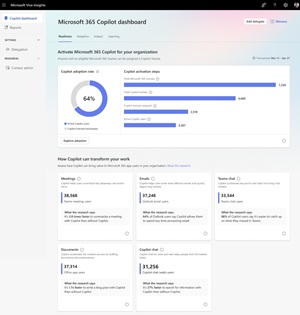 [Click on image for larger view.] Microsoft Copilot Dashboard.
What are the essentials for Copilot Success?
There are 3 essentials for Copilot Success, and they include developing leadership capabilities to leverage AI for business outcomes starting with creating an AI Council, managing the human transformation with enablement and champions programs and building technical skills to support the business to ensure your organization is AI ready.
 [Click on image for larger view.] Copilot Success.
How should leaders handle concerns about job displacement or 'AI fatigue?'
Leaders can address concerns about job displacement and AI fatigue by fostering open, empathetic communication and emphasizing that AI is meant to augment--not replace--human work. It's important to acknowledge employees' fears, provide clear examples of how AI can enhance their roles, and invest in upskilling to help them adapt and grow. Leaders should also set realistic expectations about AI's capabilities, avoid overhyping trends, and monitor for signs of burnout by encouraging healthy boundaries and celebrating progress. Leading by example and sharing personal learning journeys can further build trust and resilience during this period of rapid change.
Note: Those wishing to attend the session can save money by registering early, according to the event's pricing page. "Save $500 when you register by the Aug. 15 Summer Savings deadline," said the organizer of the event, which is presented by the parent company of Visual Studio Magazine.
About the Author
David Ramel is an editor and writer at Converge 360.