News
Post-GA Copilot Response Improvements in Visual Studio 2026
Since the Nov. 11 debut of Visual Studio 2026, Microsoft has upgraded GitHub Copilot Chat to deliver more reliable answers in day-to-day coding conversations.
A new release-notes entry titled "Better Copilot responses" describes improvements in three areas: semantic code search, awareness of external symbols, and more precise handling of line-number references. These changes are aimed at tightening the link between what developers ask and the code Copilot uses to respond.
The related Visual Studio 2026 November update published Dec. 3 also details new AI features, including a preview cloud-based agent, context-menu Copilot actions, and intent detection in All-In-One Search. Together, the release notes and the update post show Microsoft continuing to push Copilot deeper into the IDE workflow, from finding the right code to delegating multi-file tasks.
Better Copilot Responses: New Context for Chat
The release notes say Copilot responses are now "dramatically improved" through additional context injected into chats. Microsoft frames the change as a general boost for everyday tasks, specifically calling out three places where Copilot previously had more room for error: searching large codebases, reasoning about dependencies, and following a developer's pointer to a specific line of code. The new behavior is designed to reduce off-target answers and make follow-up prompts more productive.
Improved Code Search with Remote Indexes
Copilot Chat now uses enhanced semantic code search, which Microsoft says returns more relevant results for natural-language questions.
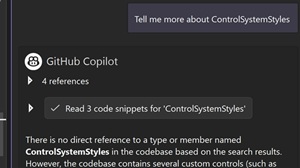 [Click on image for larger view.] Improved Code Search (source: Microsoft).
The release notes state that "Copilot Chat's code search capabilities have been enhanced to provide more relevant results" and that this yields more accurate suggestions because Copilot is better at retrieving code tied to behaviors or concepts described in plain English. Microsoft attributes the upgrade to "leveraging remote indexes of your codebases," indicating that Copilot can consult a richer, precomputed understanding of a repository rather than relying only on local or shallow matches.
In practice, this means natural-language questions about where specific behaviors are implemented or which code paths handle a given function should surface the most relevant snippets more consistently. By improving retrieval, Microsoft is directly targeting a common failure mode of coding assistants: giving correct-looking advice based on the wrong file or outdated pattern. The remote indexing approach also suggests Copilot can remain effective even in very large solutions where local search is slower or less semantically aligned with developer intent.
Awareness of External Symbols in C# Projects
Another change extends Copilot Chat's view beyond the project's own source tree. The release notes say Copilot Chat "can extend beyond your project to help you with external symbols brought in by your dependencies in C#." This is about Copilot understanding types, methods, and other symbols that come from referenced packages rather than authored-in-house code. With that broader scope, Microsoft says Copilot can provide more effective solutions because it can take dependency APIs into account while answering questions or suggesting fixes.
For C# developers working with frameworks and NuGet packages, dependency-aware reasoning matters for tasks such as interpreting stack traces, refactoring code that relies on third-party libraries, or asking Copilot to show correct usage patterns. The change indicates Copilot is no longer limited to what it can infer from the local project alone when it tries to explain or modify code that touches external APIs.
Better Accuracy when Referencing Line Numbers
Another improvement targets a small but important interaction detail: when a developer refers to a specific line or block. According to the release notes, "when you reference a specific line in your code, Copilot Chat will now provide more accurate responses." Microsoft explains that if a developer asks Copilot to look at a particular section in natural language, Copilot should now align its answer more precisely to that location.
Misalignment between what a developer points to and what Copilot analyzes can silently derail a chat. By tightening line-number referencing, Microsoft is aiming to make line-specific questions and requests for changes to a particular block more dependable, preserving conversational flow instead of forcing developers to restate context.
Additional Copilot and AI Updates in the November Update
Alongside the response-quality work, Microsoft's November 2025 update introduced several new Copilot-driven capabilities. These features share the same theme as the release notes: reducing friction between intent and IDE action. Also in this update, Copilot Chat can take a pasted URL as extra context, letting developers pull relevant external page content directly into a question for better-grounded answers.
GitHub Cloud Agent Preview
Microsoft announced a preview of the GitHub Cloud Agent inside Visual Studio. The company describes it as a way to "offload repetitive or time-consuming work" and says developers can delegate tasks such as UI cleanups, refactors, documentation updates, and multi-file edits. The agent is enabled through the Copilot badge settings and requires a solution connected to a GitHub repo, with a restart after activation. Microsoft notes that agent-created work will be reviewable through pull requests, and says PR links will appear directly inside Visual Studio in a future update.
Copilot Actions in the Context Menu
Copilot is now available directly from the editor context menu. Microsoft said developers can invoke Copilot with just one click for tasks like generating comments or explaining a class without manually typing a prompt. The context menu includes an "Optimize Selection" action that analyzes selected code and the surrounding context, producing targeted suggestions for performance, maintainability, reliability, and architecture.
Copilot Intent Detection for All-In-One Search
The update also adds intent detection to All-In-One Search via "Did You Mean" suggestions. Microsoft explains that when a developer types a search term, Copilot can propose a more relevant term if it detects the initial query is slightly off, such as a typo or fuzzy recollection. The change is intended to help when results are empty or when the top hit is not what the developer meant to find.
More on all that can be found in the companion article, "Visual Studio 2026 Gets New AI Features in November Update."
About the Author
David Ramel is an editor and writer at Converge 360.