News
At VSLive!, Mads Kristensen Lets 'the Cat out of the Bag' on Visual Studio 2027
Microsoft's Mads Kristensen revealed new features coming to Visual Studio 2027 at VSLive! Las Vegas, including AI-assisted coding, enhanced debugging tools, and improved performance.
The increased monthly release cadence for updates for Visual Studio was also detailed, with general availability of the new major version expected in November 2026 to align with the launches of .NET 11 and C# 15.
Microsoft's Jim Harrer noted Kristensen's keynote address that revealed that there would be a Visual Studio 2027 in a DevBlogs post yesterday, pointing to the video of the keynote that was just posted this week.
Kristensen, principal product manager for the flagship IDE, revealed that there would be a Visual Studio 2027 right off the bat.
"Did you know that we were going to have a Visual Studio 2027?" Kristensen asked in his opening. "No, well, I guess Jim let that cat out of the bag."
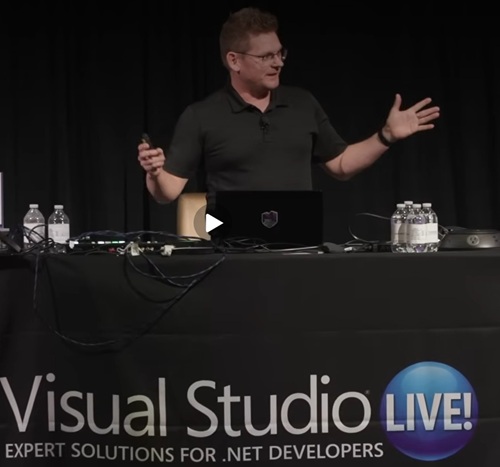 [Click on image for larger view.] Mads Kristensen (source: Microsoft).
A Continuous Release Model
In addition to the Visual Studio 2027 reveal, Kristensen also detailed the big change in cadence of the IDE. Rather than positioning 2027 as a traditional new major version that arrives as a separate, side-by-side product, the roadmap shown at VSLive! outlined a steadier month-by-month progression from late 2025 into late 2026, with new capabilities appearing along the way.
That roadmap suggests Microsoft is moving Visual Studio to a more continuous release model. Under that approach, the stable General Availability channel receives monthly updates, while the Insider channel moves on a faster weekly cadence, giving developers earlier access to features before they roll into the mainstream product. In that model, the shift from Visual Studio 2026 to Visual Studio 2027 becomes an in-place evolution of the existing environment rather than a disruptive reinstall event.
The timeline shown during the session underscored that point by treating the path to 2027 as an ongoing sequence of additions rather than a single release. The slide highlighted features such as "Cloud Agent," "WebForms Expert," "Custom agents," and "Agent skills" across the calendar, reinforcing the idea that the next version will emerge through successive updates instead of one large product reset.
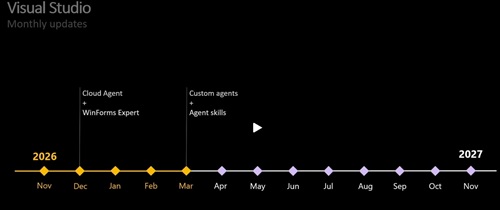 [Click on image for larger view.] Visual Studio Increased Release Cadence (source: Microsoft).
That change is significant because it marks a break from the long-standing Visual Studio pattern of major version jumps that often required teams to plan migrations separately from normal update cycles. A faster, more incremental cadence could reduce that friction while also aligning the IDE more closely with the pace of change in .NET, C#, and AI-assisted development workflows. In that sense, the Visual Studio 2027 announcement was not just about the next branded release, but about a different lifecycle for the product itself.
AI and the Professional Developer
Kristensen otherwise focused on the larger subject of AI in software development, arguing that the pace of change and the constant churn of new terms and trends can be overwhelming for developers. He said that while social media can create the impression that coding is being fully handed over to agents, the reality for most developers is still very different.
Instead, he said, developers are still spending their days in front of screens writing code, debugging applications, and managing software, even if they are also beginning to use AI tools in parts of their workflow. He framed that as the experience of the "99 percent" and argued that existing skills remain important because AI systems still lack the broader context developers bring about their systems, organizations, and future plans.
Kristensen organized that discussion around the "why," the "what," and the "how" of software development . The "why," he said, remains rooted in customer needs and business goals. The "what" -- the solution space involving architecture and design -- may change as teams use AI to help define specs, planning artifacts, and integrations. The "how" also changes, he said, but does not disappear, with developers likely to spend more time reviewing, verifying, and iterating on code, whether it is written by humans or generated with AI assistance .
Validating Code with Profiling and Agents
That shift, he said, raises the importance of tools that help developers understand and validate software. He singled out testing infrastructure as especially important, describing it as a key guard rail as more code and more pull requests potentially arrive with AI assistance. Unit tests and integration tests, he said, can reduce the amount of manual review needed by giving developers more confidence that changes are not breaking existing behavior.
To illustrate that point, Kristensen introduced a prerecorded demo from Nik Karpinsky showing a new "Profile with Copilot" capability in Visual Studio . In the demonstration, Copilot ran a unit test for the popular QR Coder library under the profiler, established a baseline, examined the captured trace, identified expensive paths in the code (specifically floating-point math), suggested optimizations, rebuilt the project, reran the test to confirm correctness, and measured a resulting performance improvement of approximately 63 percent .
After the demo, Kristensen said the feature is useful even without AI because developers can now use unit tests as an entry point into profiling to identify expensive code paths. Adding AI on top of that workflow, he said, helps close the gap between finding a performance problem and understanding how to improve it.
He said Microsoft is also applying the same thinking inside the Visual Studio code base itself. Kristensen said the team is working to strengthen its own testing so agents can eventually take on more user-reported issues, adding that stronger tests are a prerequisite for letting AI-driven tools safely work more broadly across a large code base estimated at 200 million lines. He specifically mentioned using agents to fix "paper cuts" that users have reported.
Another prerequisite, he said, is better backlog hygiene. Teams that want agents to work through backlog items need those items to be actionable, not just short titles or vague requests. Kristensen said that once stronger tests and a more usable backlog are in place, teams can begin assigning work to agents and then focus on building, running, verifying, and iterating on the results.
He then outlined several areas where Visual Studio is expected to evolve for that reality. Those areas included testing, diagnostics such as debugging and profiling, faster build-and-run workflows, integrations with other systems involved in software delivery, code review, and what he called "meaningful AI." Kristensen noted the Visual Studio test explorer hasn't been updated as fast as other tools and is a key area for modernization.
On that last point, he said Visual Studio is meant to remain a professional developer tool, and that the AI added to the product should be focused on professional workflows rather than forcing users to discover capabilities through prompting alone. He pointed to the profiler demonstration as an example of AI being added in a targeted way that fits into existing developer tasks.
The larger message of the session was that Visual Studio is being shaped for a development environment in which AI is increasingly present, but not as a replacement for developers. Kristensen's argument was that developers will still need strong skills in coding, debugging, testing, and understanding how systems fit together -- and that those skills may become even more important as AI becomes a larger part of the workflow.
VSLive! Session Resources
Meanwhile, Microsoft's Harrer had much more to say about the Las Vegas event, pointing to the VSLive! Las Vegas Youtube Playlist featuring:
- The Road to Visual Studio 2027: Building a Faster, Smarter IDE -- Mads Kristensen
- Knowledge is the Key: The Path for AI Applications -- Jerry Nixon and Drew Skwiers-Koballa
Featured sessions
- AI's Not Magic: A Developer's Guide to Using AI Tools Without the Hype -- Brian A. Randell
- Building an AI Agent to Work with Your Own Data -- Jerry Nixon
- Building Intelligent .NET Applications: From AI to Implementation -- Jon Galloway
- What's New in C# -- Jason Bock
- Building RESTful Services with ASP.NET Core -- Philip Japikse
- GitHub Actions in Action -- Marcel de Vries
- The Forgotten Features of Visual Studio You NEED In Your Life! -- Mads Kristensen
- Fast Focus: Caching Options in .NET -- Jason Bock
- VS Code and Visual Studio, Better Together -- Brian A. Randell
- Modernizing .NET Applications Faster with Visual Studio -- Jon Galloway
"What I like about this set of sessions is that it is not just theory," he said. "These talks focus on real-world scenarios, whether you are exploring AI in existing apps, modernizing older .NET solutions, improving performance, or just looking for better ways to work day to day."
Harrer closed by encouraging developers to go beyond the newly posted session videos and attend a VSLive! event in person, describing the in-person experience as more than just the sessions themselves. He pointed to the hands-on labs, hallway conversations, and direct access to speakers, product experts, and fellow developers as key parts of the draw. He also noted that Visual Studio subscribers may be eligible for exclusive pricing through the benefits section of my.visualstudio.com, while non-subscribers can use priority code VSLMS for discounted registration.
Upcoming VSLive! events include:
About the Author
David Ramel is an editor and writer at Converge 360.