Q&A
Using Data API Builder to Speed Up Application Development
Data access has long been one of the more stubborn bottlenecks in application development. Even when teams move quickly on the front end or in service layers, exposing database objects safely and usefully often means writing and maintaining a substantial amount of plumbing code. Microsoft's open-source Data API Builder aims to change that by giving developers a faster way to stand up APIs over data sources, letting them expose database objects through REST and GraphQL without building a traditional data access layer from scratch.
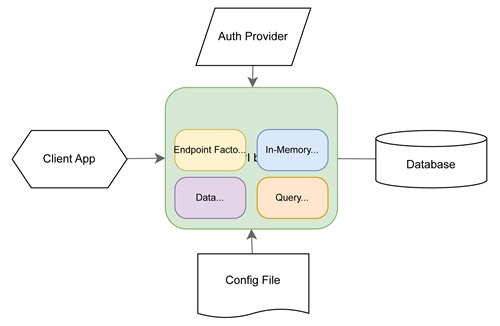 [Click on image for larger view.] Data API Builder Architecture (source: Microsoft).
That kind of acceleration is especially relevant for modern development teams juggling speed, maintainability and the growing expectation that data should be consumable by multiple kinds of clients, from conventional applications to AI-powered tooling. In the upcoming Using Data API Builder to Speed Up Application Development session at Visual Studio Live! San Diego 2026, database expert Steve Jones will walk attendees through setting up, configuring and using Data API Builder with SQL Server and PostgreSQL, while also showing how GraphQL can be used to expose, query, filter, sort and modify data.
 "I will show how to setup the technology and then connect to with the different APIs and include a number of examples in demos that explain how to get different types of data (filters, multiple columnts, etc.) from the database."
Steve Jones, The Voice of the DBA
The intermediate-level session is scheduled for Wednesday, Sept. 16, 2026, from 9:30 a.m. to 10:45 a.m. as part of the Sept. 14-18 event in San Diego.
Jones brings deep database experience to the topic. Known as “The Voice of the DBA,” he is well positioned to guide developers through a technology designed to reduce friction between applications and the data platforms they depend on. That perspective comes through in the following Q&A, where he describes Data API Builder as a way to simplify database access by presenting developers with familiar API patterns rather than requiring them to hand-code repetitive CRUD plumbing.
As Jones explains, the appeal of Data API Builder is not just speed, but flexibility. Teams can use it to expose only the database objects they want clients to access, while taking advantage of GraphQL and REST for more standardized data interactions. His session will also touch on a timely architectural question for many shops: when GraphQL makes the most sense, when REST is the better fit, and where MCP enters the picture as AI and agentic scenarios become more common in enterprise development.
Just as important, the session is set to focus on practical decision-making. That includes versioning the API consistently across a team, understanding the limits of what should be expressed through GraphQL alone, and avoiding the common mistake of pushing too much data processing to the client side. For developers looking to move faster without losing control over how data is exposed and consumed, the session offers a grounded look at a tool that could streamline a familiar pain point.
We caught up with Jones to learn more about what inspired the session, what attendees will see in the demos, and why Data API Builder is worth a closer look now.
VisualStudioMagazine: What inspired you to present on this topic?
Jones: I have seen a few presentations on this technology, including one at Live! 360, and it inspired me to investigate and experiment on my own.
What problem does Data API Builder solve especially well for teams trying to move faster?
The Data API Builder (DAB) reduces a lot of the complexity of accessing a database for developers. By using a familiar set of APIs (REST and GRAPHQL), this makes connecting to databases easier than ever for full stack developers. The API translates their requests into SQL that work very well for lots of CRUD type queries. Even for someone such as myself, who has worked with databases for over three decades, this seems like a very simple way of quickly getting data from a database.
In your session, what is the most important setup decision developers should get right first with Data API Builder?
The most important thing for me would be to ensure everyone on a team works with an explicit version of the API that is declared. This technology changes and if different developers work with different versions of the tech, they might have issues deploying their code to a production environment. I would also ensure that the team upgrades as a unit, ensuring that as new capabilities are released and bugs fixed, everyone gets the same experience.
What will you show to help attendees understand how Data API Builder works with SQL Server and PostgreSQL in practice?
I will show how to setup the technology and then connect to with the different APIs and include a number of examples in demos that explain how to get different types of data (filters, multiple columnts, etc.) from the database. I won't look to demo from C#/Java/other client languages, and assume that attendees who work in those areas are familiar with REST/GRAPHQL/MCP access to an API.
When exposing database objects, how do you balance developer speed with control over what data can be queried or changed?
I tend to prefer that most objects be exposed to developers for use in their applications. RBAC type controls are easily implemented for users that connect to databases, but for developers, they ought to have rights to access (INSERT, UPDATE, DELETE, SELECT) tables in which data is stored. There are occasionally reasons why some tables might not be exposed to an application, but I would use standard roles in SQL Server or PostgreSQL linked to client accounts for security and ensure developers see all objects that the application might need.
However, since each table/view/proc is explicitly exposed, as new objects are added, sysadmins can decide if the object is something a client needs access to and expose it. If the object is internal to the db or application management meta data, then those objects can not be added to the DAB configuration.
What is one useful way developers can take advantage of GraphQL filtering or sorting once Data API Builder is in place?
I'll show this in the session. GRAPHQL, while not intuitive, is fairly easy to use and allows you to specify the ways in which you might need to manipulate your results, similar to what a WHERE or ORDER BY clause in SQL is used. GRAPHQL is more user friendly, and the API interface includes a query builder that helps you get started.
How do you decide whether GraphQL, MCP, or REST is the best fit for a specific application scenario?
This really depends on your organization standards and team skills. I would learn to GRAPHQL for newer work, as it's a richer API and allows more specification by the client as opposed to the administrator. However, if your team primarily deals with REST and doesn't understand GRAPHQL, the training/upskilling time might not be worth the effort, especially for simpler data access. In that case, use REST.
MCP is for AI access, so if you are using AI in an agentic way, allowing the LLM to work with tools, then MCP is the way to go.
What is a common mistake teams make when modifying their API through Data API Builder for the first time?
Not understanding that the API is is a subset of what can be done with SQL. Very complex DML is hard to structure inside of a GRAPHQL query. In those cases, learning to use stored procedures for processing and having a process to create/alter those procedures is necessary.
Another common mistake is not taking advantage of filtering, in any API, and processing too much data on the client side. The best performing queries are the ones that don't access too much data, so limit what you return whenever possible.
Note: Those wishing to attend the session can save money by registering early, according to the event's pricing page. "Save $400 when you register by the Super Early Bird deadline of July 17," said the organizer of the event, which is presented by the parent company of Visual Studio Magazine.
About the Author
David Ramel is an editor and writer at Converge 360.