News
Visual Studio 2026 Gives IntelliSense Priority in Longstanding Copilot Completion Clash
Microsoft's Visual Studio 2026 April update addresses a long-running point of friction in the IDE: IntelliSense and GitHub Copilot completions competing for attention in the editor.
With Visual Studio 2026 April Update 18.5.0, Microsoft says IntelliSense now takes priority over Copilot completions.
"We heard your feedback: seeing IntelliSense and Copilot completions at the same time can be distracting," the team said. "The editor now prioritizes the IntelliSense list and shows only one suggestion at a time."
The change is enabled by default, according to the release notes. Microsoft lists April Update 18.5.0 as released April 14, 2026, followed by Visual Studio 2026 version 18.5.1 on April 21, 2026.
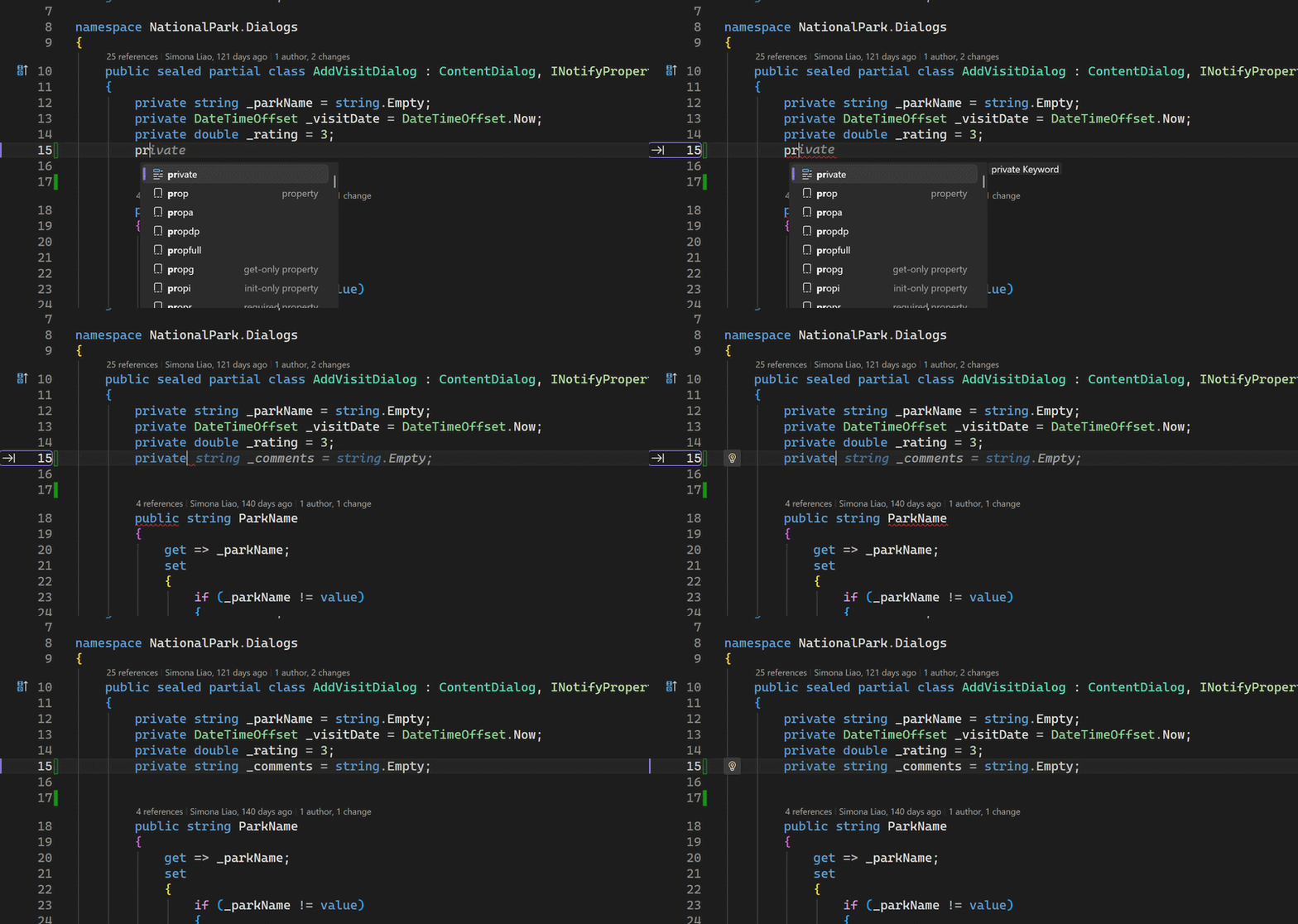 [Click on image for larger view.] IntelliSense Priority in Animated Action (source: Microsoft).
Further commenting on the issue, the team said: "When IntelliSense is active, Visual Studio temporarily suppresses Copilot completions so you can focus on your current selection. After you dismiss or commit the IntelliSense selection, Copilot completions resume. This behavior is now enabled by default. Update your VS to the latest version and code as you normally do. Please let us know any feedback you have"
The IntelliSense change is notable because it does not remove Copilot completions or replace IntelliSense with GenAI suggestions. Instead, it changes which tool gets display priority at a moment when both systems may have something to offer. In Microsoft's documented behavior, IntelliSense wins while its list is active, and Copilot returns after that editor interaction is complete.
A Years-Long IntelliSense and Copilot Issue
The update follows years of developer complaints about how Copilot and traditional completion systems interact. In 2023, Visual Studio Magazine
reported that developers were citing problems with GitHub Copilot and IntelliSense working together, including cases where Copilot suggestions interfered with familiar autocomplete behavior (see "Devs Cite Problems with GitHub Copilot and IntelliSense Working Together").
That February 2023 report described IntelliSense as known for code completion and related code editing features such as parameter info, quick info and member lists. It contrasted that with Copilot, which can generate broader code constructs and programs in response to prompts. The reported problem was not that the tools served identical purposes, but that their completion UIs and keyboard interactions could collide in daily editor use.
The issue appeared again in a June 2023 Visual Studio Magazine
report on how GitHub Copilot was made to work better with Visual Studio IntelliSense. That article covered a Microsoft change in which the IntelliSense list could steer Copilot completions, allowing a developer's IntelliSense selection to provide more context for Copilot's prediction see "GitHub Copilot Makes Nice with Visual Studio IntelliSense").
The April 2026 change takes a different approach. Rather than showing IntelliSense and Copilot completions together and trying to make them cooperate in the same moment, Visual Studio now suppresses Copilot completions while IntelliSense is active. Microsoft describes the result as one visible suggestion at a time.
Developer Community Ticket Cited Keyboard and Extension Conflicts
The associated Developer Community ticket, titled "Avoid IntelliSense and Copilot conflicts," was created by the GitHub Copilot in Visual Studio team as part of the February roadmap. The ticket said the IntelliSense completion list and Copilot suggestions could appear at the same time, creating confusion about keyboard controls such as Esc and Tab and adding cognitive load.
The ticket also cited extension-related behavior. It said that some extensions, including ReSharper, could run into race conditions in which tools suppress one another from appearing. Microsoft's stated resolution in the ticket was to prioritize IntelliSense completions over Copilot suggestions because IntelliSense was considered more predictable and because the team wanted to show one thing at a time.
The discussion also shows that not every completion problem is covered by the new behavior. One user described a case in which typing a partial method name and pressing Tab produced unexpected results instead of the selected IntelliSense completion. Microsoft responded that the report appeared to be a separate IntelliSense bug and asked for a ticket with reproduction steps and a screen recording.
Microsoft later marked the work completed for preview and pointed users to Visual Studio Insiders release notes for the IntelliSense priority change. In the same discussion, Microsoft said the implementation applied to Visual Studio's IntelliSense list and that the team was working with extenders, including the ReSharper team, to enable them to adopt the change.
IntelliSense, IntelliCode and Copilot
The change also lands after Microsoft has shifted more of its AI developer tooling toward Copilot. In December 2025, Visual Studio Magazine
reported that Microsoft had begun decommissioning IntelliCode in VS Code while keeping IntelliCode as an optional component in Visual Studio 2026.
That report described IntelliCode as a local, machine-learning-assisted completion system and Copilot as the focus of Microsoft's newer cloud-based AI development strategy. It also noted that standard language servers such as Roslyn continue to provide basic IntelliSense. Against that backdrop, the April 2026 Visual Studio change is a practical editor-level boundary: Copilot remains present, but IntelliSense receives priority when its completion list is active.
Microsoft's April release notes also tie the IntelliSense priority change to feedback. The documented item says seeing IntelliSense and Copilot completions at the same time can be distracting. It then describes the new behavior: IntelliSense is prioritized, Copilot completions are suppressed while IntelliSense is active, and Copilot completions resume after the IntelliSense selection is dismissed or committed.
Other Visual Studio 2026 April Update Changes
Microsoft also documented the following changes in Visual Studio 2026 April Update 18.5.0:
JSON editor schema updates: The JSON editor now supports newer JSON Schema specifications, including Draft 2019-09 and Draft 2020-12. Microsoft says this adds access to modern schema features such as $defs, $anchor and improved vocabulary support, while also improving IntelliSense and validation for schemas that use the latest specifications.
Copilot agent skills: Copilot agents in Visual Studio can now automatically discover and use skills defined in a repository or user profile. Microsoft describes agent skills as reusable instruction sets for tasks such as running a build pipeline, generating boilerplate or following a team's coding standards.
Cloud agent integration: Developers can start new cloud agent sessions directly from Visual Studio by selecting Cloud from the agent picker in the Chat window. Microsoft says the cloud agent asks for permission to open an issue in the repository and then creates a pull request to address it.
Custom agents: Visual Studio now supports custom agents defined in .agent.md files in a repository or user profile. Microsoft says custom agents can use workspace awareness, code understanding, tools, a selected model and MCP connections to external knowledge sources such as internal documentation, design systems, APIs and databases.
Customizable Copilot keyboard shortcuts: Developers can customize keyboard shortcuts for accepting Copilot inline suggestions. The configurable commands are Edit.AcceptSuggestion, Edit.AcceptNextWordInSuggestion and Edit.AcceptNextLineInSuggestion, with new bindings assigned under the Inline Suggestion Active scope.
New Copilot chat history panel: Copilot chat history has moved from a dropdown to a dedicated panel. The panel shows each chat title, a preview of the latest message and when the session was last updated, so users can find and reopen previous conversations.
Auto-Decoding in Text Visualizer: The Text Visualizer now includes an Auto-detect and format feature powered by Copilot. Microsoft says the feature identifies the encoding or compression format of a string and applies the necessary transformations, including converting GZip-compressed Base64 into readable text.
Agentic Issue to Resolution: Visual Studio adds a Debugger Agent workflow for bug resolution. Microsoft says the workflow validates bugs against runtime behavior and guides users through understanding, reproducing, instrumenting, isolating the root cause and validating a fix through live execution.
C++ Code Editing Tools for GitHub Copilot Agent Mode: These tools are now generally available by default. Microsoft says they help Copilot navigate C++ codebases when refactoring or modifying code, including mapping class inheritance hierarchies and following function call chains.
MSVC Build Tools version 14.51 Preview: The April update includes the first preview of Microsoft C++ Build Tools version 14.51. Microsoft says MSVC previews do not receive servicing patches and should not be used in production environments.
Version 18.5.1 Fixes
Microsoft lists Visual Studio 2026 version 18.5.1 as released April 21, 2026. The two top bug fixes from the community are an F# issue in which empty string matching in code quotations causes FS045 and an item described as adding UI to show the model thinking process.
For April Update 18.5.0, Microsoft lists top community fixes that include a Visual Studio 2026 hang while unloading projects, a Copilot terminal issue in which queued commands sometimes do not start until the terminal tab is brought to the foreground, an AddressSanitizer suppression issue, and improved AddressSanitizer runtime performance in applications that heavily use COM, mixed-language bindings and Win32 allocator APIs.
Other documented 18.5.0 fixes include a severe IntelliSense delay after upgrading to Visual Studio 2026, incorrect floating-point code generation, an error when opening a file with an unknown extension, NoWarn in PackageReference being ignored since Visual Studio 18.3.0, missing variable values on hover during debugging, an MSVC optimizer code-generation bug, a PdbCopy.exe Arm64 crash, and an update to MinGit and Git for Windows to handle the new allowNTLMAuth setting.
About the Author
David Ramel is an editor and writer at Converge 360.