News
Visual Studio Takes Aim at Copilot Billing Shock
Ever since developers using GitHub Copilot were shocked by big bills accompanying the June 1 switch to usage-based billing, Microsoft has been working to lessen that shock in various ways around token and credit usage and monitoring so users can more easily keep track of their AI usage and costs through a month.
Several tweaks along that line have been made to Visual Studio Code, and the June 2026 update to the the Visual Studio 2022 IDE falls right in step.
"GitHub Copilot usage is now calculated based on token consumption rather than by request, as part of its usage-based billing model," the team explained. "The refreshed Copilot Usage window in Visual Studio gives you a clearer view of where you stand against that model, with real-time updates as you work. Open it any time from the Copilot badge menu > Copilot Usage."
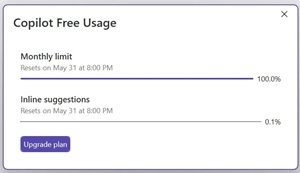 [Click on image for larger view.] Refreshed Copilot Usage Window (source: Microsoft).
Framing the move a as the start of a broader investment in Copilot usage visibility, with more to come, the team said, "You'll also see proactive alerts as you approach a limit, when you hit it, and when additional usage (overages) activates. The quota warning threshold is configurable, so you can decide how early you want the heads-up."
As noted, similar measures have already been implemented in VS Code, with the recent v1.126 update adding session-level Copilot cost information, furthering the company's attempts to help developer monitor and manage usage-based GitHub Copilot billing.
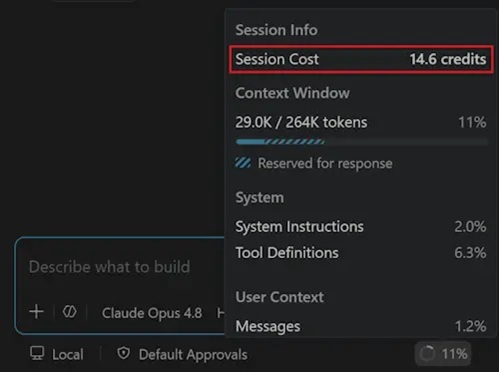 Session Cost (source: Microsoft).
The issue came to a head on June 1 when the new scheme kicked in and many developers were shocked to see almost all of their monthly credits eaten up in a day or two. The VS Code team responded by adding a Copilot spend meter and other features and functionality to mitigate the effects of the billing change, so expect the Visual Studio team to now follow suit and introduce similar features in the IDE.
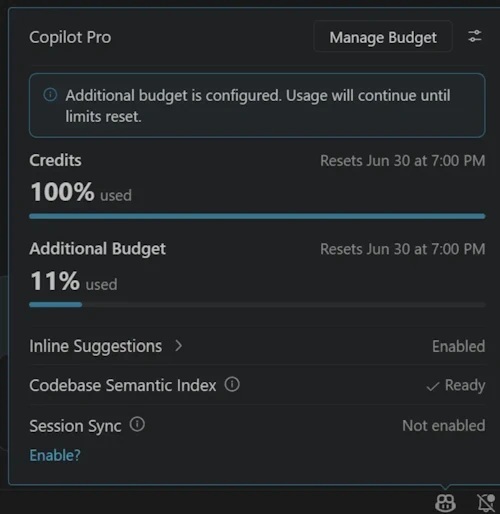 Manage Budget (source: Microsoft).
In addition to the moves above, Microsoft introduced configurable quota warning thresholds, proactive notifications when users approach or exceed their limits, user-level spending budgets and budget controls (including enterprise/organization policies), a preview billing experience showing projected monthly costs before billing, email alerts for administrators as budgets are approached, Auto model selection (which provides a 10% AI credit discount in supported Copilot experiences), and Copilot Max for users who consistently need higher AI credit limits.
Beyond Copilot usage visibility, the June update delivers several other enhancements centered on AI-assisted development, security and quality-of-life improvements. Here's a quick rundown of the remaining additions announced by Microsoft.
| Feature |
What's New |
Why It Matters |
| Trust Validation for MCP Servers |
Visual Studio now validates Model Context Protocol (MCP) server configurations and fingerprints before allowing updated servers to run, prompting developers to review any unexpected changes. |
Adds an extra security layer for AI tool integrations by helping ensure trusted MCP servers haven't been modified unexpectedly. |
| GitHub Copilot Modernization Agent for C++ |
The C++ modernization agent reaches general availability for upgrading projects to current Microsoft Visual C++ (MSVC) Build Tools, offering both fully automated and guided workflows. |
Helps developers modernize legacy C++ codebases more quickly while taking advantage of newer compiler features, performance improvements and security updates. |
| Long-Distance Next Edit Suggestions |
GitHub Copilot's Next Edit Suggestions can now predict related edits anywhere within the active file instead of only near the cursor. The feature is currently optional. |
Reduces manual navigation when making coordinated changes across large source files. |
| Full-Color Emoji Support |
Visual Studio now renders color emojis throughout the IDE, including the editor, Markdown preview, Copilot Chat, build output and Solution Explorer. |
Provides more consistent visual cues for comments, TODOs, documentation and status indicators across Windows versions. |
About the Author
David Ramel is an editor and writer at Converge 360.