News
Copilot Usage-Based Billing Gets a Token Dashboard
Microsoft has put Visual Studio's new built-in Agent Skills on a token-efficiency trial as GitHub Copilot moves to usage-based billing, promising not to enable the skills by default until testing shows they improve agent performance.
The company announced that Visual Studio 2026 v18.8 includes built-in skills created by its .NET and Azure teams. These reusable instruction packages provide specialized workflows, technical guidance and guardrails that Copilot can load when performing particular development tasks.
However, Microsoft is initially leaving all of those skills disabled.
"Currently, built-in skills are off by default, so you can review and enable only the ones that suit your tasks," Microsoft said in its July 14 announcement.
The company directly connected that decision to the economics of the new Copilot billing system.
"As we transition into the new usage-based billing model for Copilot, we want to make sure every token you spend is meaningful," Microsoft said.
Microsoft said it is evaluating both the effectiveness and cost of enabling the skills and will switch them on only after finding evidence that they improve agent performance.
A Public Test for Token-Consuming Skills
Microsoft linked directly to a public Skills Evaluation Dashboard.
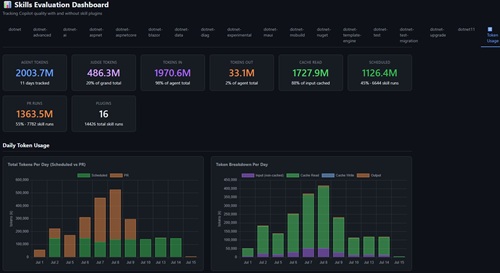 [Click on image for larger view.] Skills Evaluation Dashboard (source: GitHub).
The site describes itself as "Tracking Copilot quality with and without skill plugins." It presents summary results from the last 50 evaluation runs and charts covering the previous 14 days.
Developers can select individual .NET plugins and compare three configurations:
- Vanilla: Copilot operating without the skill.
- Isolated: Copilot provided directly with the skill being evaluated.
- Plugin: Copilot given the full plugin and required to identify and activate the appropriate skill.
The dashboard's quality section shows average scores for skilled and vanilla runs, along with the resulting quality deltas. It also identifies skill-activation failures, evaluation timeouts and possible evaluation overfitting.
An execution-time section measures how long the same tasks take with and without the skill. Most relevant to the billing discussion, a separate token section reports input, output and cached token consumption for baseline and skilled runs.
Those measurements reflect the mechanics of GitHub's new billing system. Under usage-based billing, Copilot interactions consume input, output and cached tokens. The model used and the number of tokens consumed determine how that activity is converted into GitHub AI Credits.
Agent Skills can add input context containing specialized instructions, examples, workflows and decision criteria. They can also change the way an agent approaches a task, potentially affecting the number of tool calls, responses, retries and total tokens generated.
That creates a tradeoff: A skill may consume more tokens while producing a substantially better answer, or it may add context and cost without meaningfully improving the result.
Efficiency Over Time Shows the Billing Tradeoff
The dashboard's "Efficiency Over Time" section provides perhaps its most practical view of that tradeoff, plotting execution time and token consumption for individual evaluation scenarios across the previous 14 days. Those charts compare execution time and token consumption for isolated skills, full plugins and vanilla Copilot across individual evaluation scenarios
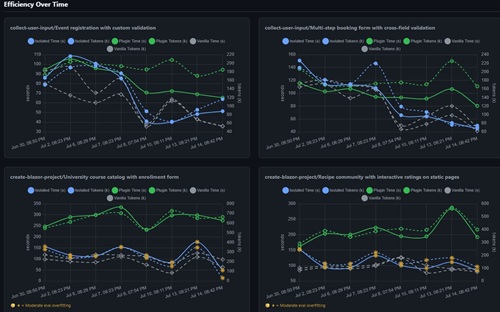 [Click on image for larger view.] Efficiency Over Time (source: GitHub).
Each chart compares vanilla Copilot with an isolated skill and the complete plugin, using separate axes for elapsed seconds and tokens measured in thousands. That lets developers see whether a skill consistently adds token overhead, whether the full plugin consumes more than the isolated skill and whether those patterns change according to the task being tested.
The scenario-level breakdown is important because a skill does not impose one fixed token cost. In the dashboard's tests, the relationship among vanilla, isolated and plugin usage varies across tasks such as creating forms and generating Blazor projects. A skill that appears efficient for one type of work may require substantially more tokens for another.
Development teams could use those comparisons to create rough skill-enablement policies -- for example, reserving a relatively token-heavy skill for complex project creation or specialized work while leaving it disabled for routine edits. They could also watch for regressions in which token consumption rises over time without a corresponding improvement in quality.
However, the charts remain comparative benchmark data rather than billing guidance. They do not convert tokens into GitHub AI Credits or dollars, apply the results to a team's own repositories or explain how large a quality gain should be required to justify the additional consumption.
Designed to Answer: Is the Skill Worth It?
The evaluation infrastructure behind the dashboard makes that tradeoff explicit.
The skill-validator in Microsoft's open source dotnet/skills repository runs an agent with and without a skill, collects token usage, tool calls, execution time, errors and task-completion results, and then compares the outputs.
"You've built a bunch of skills. But are they actually helping or just adding noise?" the tool's documentation asks.
The validator is intended to determine whether a skill is "worth keeping" and to identify existing skills that may stop helping as newer models become more capable.
Quality remains the dominant factor in its scoring. Rubric quality, overall quality and task completion account for 85 percent of the improvement score, while token reduction carries a 5 percent weight. Error reduction, tool-call reduction and execution time make up the remainder.
Microsoft therefore is not requiring a skill to reduce token consumption in order to pass. A skill can use more tokens and still be judged worthwhile when the resulting quality improvement is sufficiently large.
The validator documentation also warns that overly long skills can work against the agent. It identifies 800 to 2,500 tokens as a preferred range, says comprehensive skills exceeding 5,000 tokens can degrade performance and reports that a small number of focused skills can outperform larger bundles.
Useful Evidence, but Not Yet a Cost Tool
Despite Microsoft's explicit connection between the dashboard and usage-based billing, it has provided little guidance about how an individual developer or development team should use the site to control Copilot consumption.
For the dashboard to become a direct cost-management tool, Microsoft would likely need to connect its benchmark results with Visual Studio's session-usage reporting and GitHub's AI Credit system. That could let the IDE explain how much an enabled skill contributed to a real session's token consumption and whether its use appears to have reduced retries or improved task completion.
Microsoft has not announced such functionality.
For now, the dashboard establishes something still notable in the fast-moving coding-agent space: Microsoft is publicly testing whether additional agent instructions earn the tokens they consume -- and explicitly tying the decision to enable them to Copilot's usage-based billing model.
About the Author
David Ramel is an editor and writer at Converge 360.