News
VS Code 1.129 Introduces Agent Host and Experimental Agents Window Editor
Microsoft has released Visual Studio Code 1.129 with two related changes at the center of its agent-development work: a dedicated agent host process and an experimental editor panel inside the Agents window.
The July 15, 2026, release reorganizes how supported agent sessions are run, shared and displayed. The agent host can run harnesses for Copilot, Claude and Codex outside the main VS Code process, while the redesigned Agents window panel places files, diffs and follow-up actions in a docked editor beside the conversation.
VS Code 1.129 also introduces agent-controlled session-management tools, terminal command execution from chat, support for Bring Your Own Key models in the Agents window, prompt-file migration, a modern interface preview, GitHub Enterprise authentication for Copilot and changes affecting custom editors.
Agent Sessions Move Into a Dedicated Host
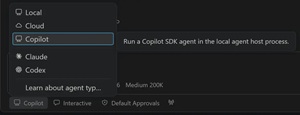
The agent host is a dedicated process that runs agent harnesses, including Copilot, Claude and Codex. It is based on Microsoft's Agent Host Protocol, or AHP, which defines a model in which multiple clients can connect to the same agent session while receiving a synchronized view of its state.
 [Click on image for larger view.] Agent Host (source: Microsoft).
Because a session lives in the separate host process, the same session can be connected to and rendered from multiple VS Code windows at the same time. The protocol documentation describes the host as the authoritative owner of session state, sequencing and reconciliation. Clients can apply actions locally and then reconcile them against the ordered updates returned by the host.
The Copilot agent running through the host is powered by the Copilot SDK. Microsoft said this aligns its behavior and functionality with Copilot CLI, the standalone GitHub Copilot application and other Copilot products.
The agent host is being rolled out in both the standard editor window and the dedicated Agents window. Users can opt in with the chat.agentHost.enabled setting and then select an available host-based harness from the harness dropdown. Microsoft noted that the setting can be managed at the organization level, in which case users must contact an administrator to change it.
Some features are available only when an agent runs through the host. The release documentation identifies separate settings where additional opt-in configuration is required, including a preference setting for running the Claude agent through the agent host.
The Agents window itself remains a preview feature. It is designed as an agent-first counterpart to the regular editor window, providing a centralized view of sessions across projects. It shares sessions, settings and keybindings with the main VS Code window, allowing a session to be accessed from either surface.
Experimental Editor Panel Brings Files and Diffs Into the Conversation
The new experimental editor panel changes how developers inspect an agent's output inside the Agents window. Previously, the conversation and detail area were presented as separate surfaces. The new layout combines the editor and detail area in a single docked pane with a shared tab bar.
Files and diffs can be opened directly in the docked editor next to the chat. Users can also add editor tabs with a New Tab action that follows the design of the chat tab strip.
The Changes view receives an updated diff experience. Developers can switch between inline and side-by-side diff layouts, expand or collapse all changed files and use a more compact representation intended to show more of each change on the screen.
Actions associated with the next stage of the workflow can appear in the editor tab title. Microsoft's example is Create Pull Request. Editor keyboard commands, including those used to switch the diff presentation, work as they do in the main VS Code editor window.
The layout also retains session-specific interface state. When developers move between sessions or reload the Agents window, VS Code restores the side-pane width, open editors, active editor and collapsed state for individual files.
The panel is not enabled by default as a stable feature. Users must enable sessions.layout.singlePaneDetailPanel and reload the window. Microsoft said the setting is read once during startup.
The wider Agents window continues to provide a sessions list, chat area and views for workspace files and changes. Its Changes view can show files that an agent added, modified or deleted, and selecting a changed file opens a diff against the current workspace state. The documentation also describes controls for committing, merging, checking out or discarding agent edits, depending on the session and isolation type.
Agents Can Create and Coordinate Other Sessions
Agent host sessions now expose session-management tools that let an agent list, create, inspect and act on other sessions and chats without requiring the user to leave the current conversation.
An agent can list sessions with their status, workspace and changes. Archived sessions are omitted unless they are specifically requested. The tools can also read the recent conversation from another session, create a session, add a chat to an existing session and send a message to a session or chat created through the tools.
VS Code displays an Open Session control when a tool creates or targets another session. Sending a message to another session requires user confirmation. An agent cannot message its own chat, and VS Code limits bursts of outgoing messages to prevent a single request from creating an unlimited fan-out of session activity.
The Agents window's new-session flow also remembers the previously selected agent mode and approval choices. A New Worktree checkbox replaces the earlier folder-versus-worktree isolation dropdown. Selecting the checkbox runs the session in a separate Git worktree; leaving it cleared uses the current folder.
Chat Adds Direct Terminal Command Execution
Developers can now begin a chat message with an exclamation point to run the rest of the message as a terminal command. The feature works in agent host sessions in both the main editor and the Agents window.
The release also adds Bring Your Own Key model support when the Copilot harness is selected in an agent host session in the Agents window.
An experimental migration feature addresses differences between prompt files and agent skills. Prompt files with the *.prompt.md extension are supported by the Local agent harness, while other harnesses expose slash-command behavior through skills. With chat.customizations.promptMigration.enabled enabled, VS Code can display a Migrate Prompts entry when compatible prompt files are available.
The migration interface finds prompt files in workspace .github/prompts/ directories and user-data locations. Users can select files to migrate and open the generated skills after conversion.
Editor, Authentication and API Changes
Outside the agent-focused work, VS Code 1.129 adds a Reopen Editor With submenu to the editor toolbar. When a file or diff supports multiple editors, users can select another editor from the toolbar's ellipsis menu rather than opening the Command Palette.
The release also includes an experimental modernized workbench appearance. It is controlled by workbench.experimental.modernUI and is enabled by default in Insiders builds.
For enterprise authentication, the agent host can now authenticate Copilot through a GitHub Enterprise instance. Previously, the host's Copilot authentication targeted github.com for the OAuth flow and token request, preventing subscriptions backed by a GitHub Enterprise instance from completing sign-in.
Users can now select their GitHub Enterprise instance during Copilot sign-in, after which VS Code directs the authentication flow and Copilot token request to that host. The capability works in both the editor and Agents window and applies to the Copilot and Claude agents. The agent host must be enabled.
A proposed API change modifies how custom editors participate in diff and merge workflows. Custom editors now opt out of diff and merge editors by default, allowing a file to continue opening in its custom editor while its diffs and merges use built-in text editors.
The proposed customEditorPriority API provides separate priorities for normal text editors, diff editors and merge editors. A new never value prevents automatic selection for a given editor type while leaving that editor available for explicit selection. When the text diff editor cannot display binary content, VS Code falls back to a compatible custom diff editor.
About the Author
David Ramel is an editor and writer at Converge 360.