C# Corner
Roslyn CTP Code Analysis
Learn how to leverage the C# code analysis and compilation features in the Roslyn CTP.
In the last installment of
C# corner, I demonstrated how to use the Scripting APIs using the recently released Roslyn CTP. In this edition I'll demonstrate how to utilize the Roslyn Compiler APIs to analyze the syntax and semantics of code as well as compile it.
Traditionally, the C# compiler has been a bit of a black box: code goes in as text, and an executable or library comes out. Reflection can take you very far in finding out the structure of a running application or assembly, but it does have its limitations. With Roslyn you can literally read in a C# file or Visual Studio solution, analyze the code, modify it and compile a new assembly.
Syntactic Analysis
A syntax tree is the full representation of a parsed piece of code. It contains syntax nodes, tokens and trivia.
- Syntax nodes represent expressions, statements and declarations
- Syntax tokens represent keywords, identifiers, and operators
- Syntax trivia represent whitespace, end of line characters, comments and other inconsequential data of the parse tree
To parse a simple program as text into a syntax tree you can use the ParseCompilationUnit factory method on the SyntaxTree class.
SyntaxTree tree = SyntaxTree
		.ParseCompilationUnit(@"using System;
                                         using System.Collections.Generic;
                                         using System.Linq;
                                         using System.Text;

                                         namespace VSMRoslynDemo
                                         {
                                             class Program
                                             {
                                                 static void Main(string[] args)
                                                 {
                                                     Console.WriteLine(""Hello!"");
                                                                        }
                                                                    }
                                                                }");
With the syntax tree you can now begin analyzing the full structure of the program. For example, to find all of the using statements in the program you could run the following snippet:
 IEnumerable<UsingDirectiveSyntax> usings =
tree.Root.DescendentNodes().OfType<UsingDirectiveSyntax>();
Once you have the using statements, you could retrieve the namespaces easily by using LINQ.
 IEnumerable<string> namespaces =
(from u in usings select u.Name.GetFullText());
Similarly, to retrieve all of the method declarations you would run:
 IEnumerable<MethodDeclarationSyntax> methods =
tree.Root.DescendentNodes().OfType<MethodDeclarationSyntax>();
The UsingDirectiveSyntax and MethodDeclarationSyntax structures are each derivatives of the SyntaxNode and contain all the information needed to fully describe a using and a method expression respectively.
Semantic Analysis
While traversing a SyntaxNode is an interesting exercise in itself, there are other means to determine the semantics of your code. The Compilation class is used to analyze and compile one or many syntax trees.
To create a Compilation object, the Create factory method on the Compilation class is used. For example, to create a new compilation named "TestProgram.exe" using the previously created syntax tree, you would run:
Compilation compilation = Compilation.Create("TestProgram.exe",
syntaxTrees: new[] { tree },
options: new CompilationOptions(assemblyKind: AssemblyKind.ConsoleApplication),
references: new[] {
                new AssemblyFileReference(typeof(object).Assembly.Location),
                new AssemblyFileReference(typeof(IQueryable<>).Assembly.Location)
});
A Compilation contains all the information necessary to compile a program. This includes all the necessary source files, assembly references and compiler options. The references used for the compilation are stored in the References property, and the compiler options are stored in the Options property. I've declared the TestProgram.exe compilation as a Console Application with references to both mscorlib.dll and System.Core.dll.
A Compilation object also allows for retrieval of a SemanticModel of a given SyntaxTree through the GetSemanticModel method:
SemanticModel semanticModel = compilation.GetSemanticModel(tree);
With a SemanticModel object, you can easily retrieve Symbols throughout your project. A Symbol represents either a type, namespace, variable or method. Symbols can be retrieved from a given SyntaxNode structure.
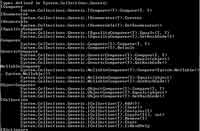
For example, to retrieve all of the types defined in the System.Collections.Generic namespace, you'd first retrieve the SemanticInfo for the NameSyntax node that represents the namespace and then retrieve the NamespaceSymbol through the SemanticModel:
 CompilationUnitSyntax root = (CompilationUnitSyntax)tree.Root;
            NameSyntax systemName = root.Usings[1].Name;
            SemanticInfo systemNameSemantics = semanticModel.GetSemanticInfo(systemName);
            NamespaceSymbol systemNameSymbol = (NamespaceSymbol)systemNameSemantics.Symbol;
 IEnumerable<NamedTypeSymbol> typeSymbols = systemNameSymbol.GetTypeMembers();
You could then use the NamedTypeSmbol collection to retrieve all user accessible methods per type, for example:
Console.WriteLine(String.Format("Types defined in {0}",systemNameSymbol.ToDisplayString()));
            foreach (var typeSymbol in typeSymbols)
            {
                Console.WriteLine(typeSymbol.Name);

                foreach (var member in typeSymbol.GetMembers())
                {
                    if (member.CanBeReferencedByName)
                    {
                        Console.WriteLine("\t" + member.ToDisplayString());
                    }
                }
            }
[Click on image for larger view.] |
| Figure 1. Excerpt of output of System.Collection.Generic types and members using Rosyln. |
Compilation
A Compilation instance can also be used to emit a compiled assembly or executable to a stream or file. The test program defined in the syntax tree can be compiled to an executable using the Emit method on the Compilation object, as follows:
using (var file = new FileStream("TestProgram.exe", FileMode.Create))
            {
                var result = compilation.Emit(file);
            }

[Click on image for larger view.] |
| Figure 2. Running TestProgram.exe compiled from the host application. |
Useful Tool
I've just demonstrated how Rosyln can be used to analyze and compile code. These two features, along with its script hosting ability, should prove to be quite useful to tool developers and application developers alike. If you'd like to hear more about Roslyn, such as how to create a custom refactoring, please leave a comment below.
About the Author
Eric Vogel is a Senior Software Developer for Red Cedar Solutions Group in Okemos, Michigan. He is the president of the Greater Lansing User Group for .NET. Eric enjoys learning about software architecture and craftsmanship, and is always looking for ways to create more robust and testable applications. Contact him at [email protected].