News
Better Debugging Highlights Microsoft's Node-ChakraCore Branch of Node.js
Microsoft continues to update its Node-ChakraCore project, which started out to expand the reach of Node.js with an open source branch and then changed direction to improve Node.js functionality such as debugging, its No. 1 pain point.
The company last week announced a preview update to Node-ChakraCore, which debuted in May 2015.
Based on Node.js 8, the new v8.21 release includes some new features along with stable platform builds (Windows, Linux and macOS) incorporating Time-Travel Debugging, a new approach that addresses the No. 1 pain point of Node.js developers as identified in a RisingStack survey.
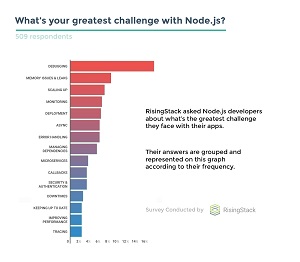 [Click on image for larger view.] Node.js Debugging Is Major Pain (source: RisingStack).
But the Node-ChakraCore project didn't start out to improve the functionality of Node.js. The original goal was simply to broaden its reach by offering Microsoft's open source ChakraCore (based on the company's Chakra JavaScript engine) as an option to the runtime's default Chrome V8 engine. That lets Node.js developers work with Microsoft's new Windows 10 IoT Core platform for Internet of Things devices.
"From the beginning, it's been clear that in addition to growing the reach of Node.js ecosystem, there's a need to address real problems facing developers and the Node.js ecosystem through innovation, openness and community collaboration," said Arunesh Chandra, senior program manager for Chakra, in last week's post.
In addition to Time-Travel Debugging, which is supported in the Visual Studio Code editor, that collaboration and the Microsoft branch of Node.js resulted in the "next-generation Node.js API" called N-API and an experimental port of Node.js to run on iOS via Node-ChakraCore.
Now that Node-ChakraCore has full cross-platform support, Chandra said the dev team is turning to new priorities, such as improving performance and module compatibility. Chandra invited community developers to pitch in on the effort, and suggested ways to do so that don't involve writing code for people in different roles:
- Node.js developer -- Try testing Node-ChakraCore in your project, and use Time-Travel debugging with VSCode and let us know how it goes.
- Node.js module maintainer -- Try testing your module with Node-ChakraCore. Use these instructions to add Node-ChakraCore in your own CI to ensure ongoing compatibility. If you run into issues, please let us know at our repo or our gitter channel.
- Native module maintainer -- Consider porting your module to N-API. This will help insulate your module from breakage due to new Node releases and will also work with Node-ChakraCore.
"We are always delighted to see the community build and extend Node-ChakraCore in novel and interesting ways," Chandra said.
About the Author
David Ramel is an editor and writer at Converge 360.