News
Two New Features in SQL Server Management Studio
Microsoft has updated its SQL Server Management Studio to version 17.3, adding two features along with various minor enhancements and bug fixes.
SSMS 17.3, made available for download earlier this month, adds an Import Flat File Wizard and an XEvent Profiler.
The Import Flat File Wizard streamlines the process of importing a flat file into a SQL table, which was previously done with the Import Data wizard, which provided a lot more functionality than is needed for a simple flat file import.
"There is a need for a tool or technology that simplifies the import experience by reducing the amount of user configuration required to properly import complex flat file structures," Microsoft said in a blog post.
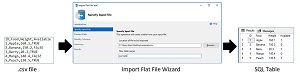 [Click on image for larger view.] The Import Flat File Wizard (source: Microsoft).
That technology is actually being provided by the Microsoft Program Synthesis using Examples (PROSE) SDK. It examines raw semi-structured data in order to find patterns to facilitate predictive file splitting, in effect inferring the appropriate column names, types, delimiters and so on.
So, instead of going through the configuration and settings associated with the Import Data Wizard, developers need only identify the input file and assign it a new name to import it. The exact steps for doing that are provided in a tutorial.
The other new feature, XEvent Profiler, can display a live target view of Extended Events, the general event-handling system for server systems. Extended Events supports the correlation of data from SQL Server, and sometimes correlation of data from the OS and database applications.
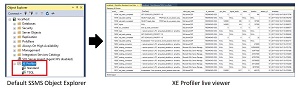 [Click on image for larger view.] The XEvent Profiler (source: Microsoft).
"In SSMS, the existing extended events functionality already provides a flexible definition of sessions and views, but lacks the 'quick view' capability of SQL Profiler," Microsoft explained. "XEvent Profiler generates that view just as fast as SQL Profiler, while also allowing for view customization that can be shared with other SSMS users as a *.viewsettings file."
There's a tutorial for that, too.
Other enhancements to SSMS 17.3 include:
- Updated waits filtering and categorization in Performance Dashboard historical waits report.
- Added the syntax check of the "Predict" function.
- Added the syntax check of the External Library Management queries.
- Added SMO support for External Library Management.
- Added "Start PowerShell" support to "Registered Servers" window (requires a new SQL PowerShell module).
- Always On: added read-only routing support for availability groups.
- Added an option to send tracing details to the Output Window for "Active Directory - Universal with MFA support" logins (off by default; needs to be turned on in user settings under "Tools > Options > Azure Services > Azure Cloud > ADAL Output Window Trace Level").
- Query Store:
- Query Store UI will be accessible even when QDS is OFF as long as QDS have recorded any data.
- Query Store UI now exposes waits categorization in all the existing reports. This will let customers unlock the scenarios of Top Waiting Queries and many more.
- Made inclusion of the scripting parameters headers optional (off by default; can be enabled in user settings under "Tools > Options > SQL Server Object Explorer > Scripting > Include scripting parameters header") - Connect item 3139199.
- Removed "RC" branding.
Details on these changes and much more information is provided in the release notes.
About the Author
David Ramel is an editor and writer at Converge 360.