News
Visual Studio IDE Tracks VS Code Extension Model
Microsoft's flagship Visual Studio IDE is continuing to track the extension model introduced with the company's lightweight, open source, cross-platform Visual Studio Code editor.
The latest move in that direction introduces support for debug adapters, which let Visual Studio developers implement debugging extensions they've previously written for VS Code, with a little tweaking.
One of the most popular features of VS Code is its extension model, allowing developers to add all kinds of functionality from its Marketplace. For example, its top five extensions have all been downloaded more than 6 million times, with the Python programming language extension topping the list at more than 8.2 million installs.
While the extension model was baked into VS Code from its beginning, Microsoft only began to introduce the model to Visual Studio IDE last November, with the release of the Language Server Protocol preview. Developed by Microsoft and hosted on GitHub, that protocol provides a standard way to provide language service features to code editors, such as IntelliSense, error diagnostics, find all references, auto complete, go to definition and so on.
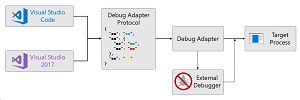 [Click on image for larger view.] Debug Adapter Overview (source: Microsoft).
Yesterday (March 26), the Visual Studio Engineering Team announced the addition of support for debug adapters and explained how to start using them.
"Now, in Visual Studio 2017 version 15.6, we're excited to announce support for another Visual Studio Code extension component -- the debug adapter," said Andrew Crawley senior software engineer, Visual Studio, in a blog post.
"If you've previously written a debugging extension for Visual Studio Code, you can now use it in Visual Studio as well, generally with only minor modifications. If you're considering implementing debugging support for a language or runtime, doing so via a debug adapter will allow you to reach both Visual Studio and Visual Studio Code customers without having to support two separate codebases."
He said the Debug Adapter Protocol is JSON-based, providing libraries for using it with many languages including Node.JS and C#/VB.Net.
More information is available in the GitHub site for the Visual Studio Debug Adapter Host, the Debug Adapter Host wiki and documentation for adding a Language Server Protocol extension.
About the Author
David Ramel is an editor and writer at Converge 360.