News
VS Code 1.43 Polishes JavaScript Debugger, Other Preview Features
Visual Studio Code 1.43, the February 2020 update, is out with the usual phalanx of new features, tweaks, bug fixes and more.
The update continues to polish new features presented in preview that were introduced in the January update, including a JavaScript Debugger. It comes bundled in early-preview Insiders builds, and it can be installed in Stable builds via the VS Code Marketplace.
"This month we've continued making progress on our new JavaScript debugger," Microsoft said in a March 10 announcement post. "You can start using it with your existing launch configurations by enabling the debug.javascript.usePreview setting."
That progress included:
- Pretty printing: The debugger can now pretty print files, which Microsoft said is especially useful for dealing with minified sources.
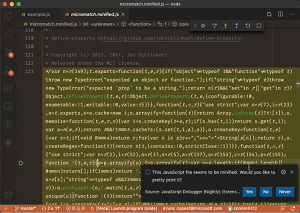 [Click on image for larger, animated GIF view.] Pretty Printing in Action (source: Microsoft).
- Support for Microsoft Edge and WebView2: VS Code now supports launching the new Microsoft Edge browser.
- Remote debugging: Developers can now debug browser source code from remote workspaces such as VS Online or Remote SSH.
Another new preview feature is "Settings Sync."
"We have been working the last couple of months to support synchronizing VS Code settings, extensions, and keyboard shortcuts across machines (popular feature request #2743)," the VS Code team said. "In this milestone, we are happy to announce that this feature is ready for preview from our next 1.44.0 Insider release. You can now have your preferences synchronized in all your VS Code installs across all your machines. You can also bootstrap VS Code with your personal preferences on a fresh machine with minimal effort."
Work also continued to support remote development in VS Code, a huge feature for the cross-platform, open-source code editor. Remote development is provided via extensions, which gives developers full-featured development environment choices: use a container, remote machine, or the Windows Subsystem for Linux (WSL).
Remote development feature highlights in v1.43 include:
- Open remote workspaces via application links.
- Remote - SSH: Support for Windows and macOS SSH hosts.
- Remote - SSH: Connection sharing on by default.
- Remote - WSL: Check out the recent Using Docker in WSL 2 blog post.
Other new features for the workbench, editor, accessibility, languages and many more areas include:
- Search Editors: "After a few iterations stabilizing on Insiders, we are shipping Search Editors, which let you view workspace search results in a full-sized editor, complete with syntax highlighting and optional lines of surrounding context. This has been a highly requested feature for some time."
- Draggable sash corners: "Did you know you could resize two orthogonal sashes simultaneously by grabbing and dragging the intersection between them? This already worked for editor sashes, and now it also works in the edges between editors and views."
- Linux screen reader support: "With the help of the community, we have been working on making VS Code accessible on Linux with the Orca screen reader."
- Minimap sizing options: "New options to fit or fill the minimap vertical layout."
- Column selection mode: "There is a new global toggle, accessible via the Selection > Column Selection Mode menu item. Once this mode is entered, as indicated in the Status bar, the mouse gestures and the arrow keys will create a column selection."
- Display whitespace on selection: "The default value of the
editor.renderWhitespace setting has changed from none to selection. Whitespace characters will now be rendered on highlighted text by default."
- Convert to template string: "You can use the new Convert to template string refactoring for JavaScript and TypeScript to quickly convert string concatenations to template strings."
- JS/TS Call Hierarchy view: The update supports the new TypeScript 3.8 release, which brings call hierarchy support in JavaScript and TypeScript, providing the ability to view all calls to or from a function and drill into callers of callers.
Finally, a list of 14 notable fixes is available here.
The development of Visual Studio Code by Microsoft staffers and many community contributors is carried out on GitHub, where the project has garnered more than 92,000 stars.
About the Author
David Ramel is an editor and writer at Converge 360.