News
What's New for .NET, Mobile, C++ and Debugging in Visual Studio 2019 v16.5
Microsoft released Visual Studio 2019 version 16.5 with new features for .NET, C++, debugging and many more areas.
The .NET ecosystem improvements affect mobile development with Xamarin as well as several productivity enhancements. For the latter, Microsoft announced:
- Statement conversion: Developers can now convert
if statements to switch statements or switch expressions via the Quick Actions and Refactorings menu.
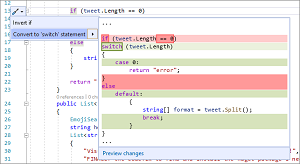 [Click on image for larger view.] Convert If Statements to Switch Statement (source: Microsoft).
- IntelliSense: This now helps in the completion of unimported extension methods, accessible via the menu thusly: Tools > Options > Text Editor > C# > Intellisense > Show items from unimported namespaces(experimental).
- Interpolation simplification: Coders can now simplify string interpolation refactoring to help make string interpolation more legible and concise. This is available via the Quick Actions and Refactorings menu.
- .NET Core testing: Profiling -- used to identify performance issues in source code -- now works with .NET Core tests.
- .NET and C++ debugging: C++ coders can now leverage pinnable properties -- used in the debugging of managed code -- for DataTips and the Autos, Locals, and Watch windows. New functionality also improves the debugging of multithreaded applications and allows for the debugging of processes running in Docker Linux containers. Finally, code jockeys who leverage the Open Enclave SDK now enjoy debugging support, "So, you can now debug those applications from within the product." More information is available here.
- .NET Object Allocation Tool: This tool, used to analyze memory usage among other things, received updates to help users more easily visualize data and quicken memory investigations.
On the C++ side of things, the goodies include:
- The ability to interact with stored remote connections via the command line. "This is useful for tasks such as provisioning new development machines or setting up Visual Studio in continuous integration."
- The ability to leverage native support for Windows Subsystem for Linux (WSL) when separating build systems from remote deployment machines. This functionality, which works on CMake projects and MSBuild-based Linux projects, enables C++ devs to build projects natively on WSL and then deploy the project's build artifacts to a remote machine for debugging.
- The ability to add, remove, and rename source files and targets in CMake projects from the IDE without the need to manually edit CMake scripts.
- CMake code navigation features including
Go To Definition and Find All References are available to ease the exploration and understanding of complex CMake projects.
Mobile developers using Xamarin, meanwhile, can now leverage the much-requested and long-awaited "hot reload" functionality when using Xamarin.Forms, which is instrumental in creating cross-platform UIs.
"This feature speeds up your development and makes it easier to build, experiment, and iterate over your mobile app's user interface," said Jacqueline Widdis, program manager on the release team, in a blog post today (March 16).
"How? You do not need to rebuild your app each time you tweak your UI as changes instantly show while the app is running! Because this updates as you make changes, if you have interacted with the application, the state of the application is not lost as you make the changes. Consequently, you do not have to recreate the repo as you previously did. That's pretty exciting, isn't it?"
More information on all of the above and much more is included in the release notes for Visual Studio 2019 v16.5.
Now it's on to Visual Studio 2019 v16.6 Preview 1, for which the release notes have already been posted. Look for more advances in WPF/UWP tooling, JavaScript/TypeScript, C++ and web tooling, along with a bunch of fixes and other tweaks.
About the Author
David Ramel is an editor and writer at Converge 360.