News
VS Code Update Adds Python Tutorials
The Visual Studio Code dev team added new Python tutorials as part of the regular monthly update, this one for March 2020, bringing the open-source, cross-platform code editor to version 1.44.
Python is huge among VS Code developers. The Python extension dominates the available tools in the VS Code Marketplace, where it has been downloaded more than 18.5 million times, almost 8 million more than the second-most popular extension.
Continuing its years long effort to serve that vast audience, the team introduced two new tutorials:
The team also threw the C++ crowd some love, rewriting the C++ extension tutorials and adding a new one: Using C++ on Linux.
Other extensions that received attention help out with remote development, something particularly germane in the age of COVID-19. The remote development extensions let developers set up full-featured development environments via containers, remote machines, or the Windows Subsystem for Linux (WSL).
Remote development enhancements let developers directly check out Pull Requests into containers and boost support for Kubernetes.
Specifically, improvements to remote development with containers include:
- Check out a PR directly into a container.
- Kubernetes container attach support.
- Experimental WSL2 Docker engine support.
More information on remote development is available in the release notes.
Other highlights of the release as summarized by the team include:
- Accessibility improvements - Easier diff view navigation, clearer role designations for UI controls.
- Timeline view - See time-series events like Git commit history from within VS Code: "The Timeline view is now out of preview and enabled by default. This is a unified view for visualizing time-series events (for example, Git commits, file saves, test runs, etc.) for a file."
- Better Quick Open for files - Navigate smoothly from files to symbols, filter files by folder name: "The Quick Open (Ctrl+P) control was using an old version of our tree widget, and in this iteration, it was migrated to use our latest list control, already used in the rest of the VS Code UI. Functionally, you should not be able to tell the difference, as all commands will work as before."
- Extension Pack display - Quickly see what is bundled in an Extension Pack: "To identify Extension Packs in the Extensions view, there is now a number badge that shows the number of extensions included in the Extension Pack." Also the Extension details page displays all extensions bundled in an Extension Pack, as shown here:
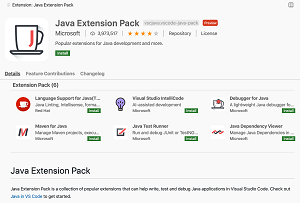 [Click on image for larger view.] Improved Extension Pack Display (source: Microsoft).
- Persisted Undo/Redo stack - Undo/Redo stack preserved for reopened files: "VS Code will now keep the Undo/Redo stack of a file when the file is closed. When the file is reopened, if its contents hasn't changed since it was closed, the Undo/Redo stack will be restored."
- Settings Sync preview - Settings Sync now lets you share snippets and UI state across machines: "We have been working the last couple of months to support synchronizing VS Code settings, extensions, and keyboard shortcuts across machines and this feature is available for preview on the Insiders release. In this milestone, we added synchronizing User Snippets and more UI State."
See the announcement post for more improvements concerning debugging, the integrated terminal, languages, tasks, notable fixes and more.
About the Author
David Ramel is an editor and writer at Converge 360.