News
Microsoft Show Highlights DevExpress Desktop Controls
The Visual Studio Toolbox show on Microsoft's Channel 9 video site this week took a look at desktop components from third-party vendor DevExpress.
While much attention in the Microsoft-centric developer space is devoted to cutting-edge goodies like Blazor, .NET Core and the upcoming .NET 5, show host Robert Green and DevExpress CTO Julian Bucknall discussed "legacy" or "traditional" apps leveraging desktop components such as WinForms and Windows Presentation Foundation (WPF). DevExpress (officially Developer Express Inc.) is one of the primary third-party vendors touted by Microsoft for wares like Blazor, along with Telerik, Syncfusion, Radzen, Infragistics, GrapeCity and others, as detailed on the Blazor site.
But for this week's Visual Studio Toolbox show, the focus was on UI for Windows apps, for which DevExpress offers a variety of controls and components.
Bucknall said he didn't want to call them "legacy" apps, but maybe "traditional" standard Windows applications.
"Legacy is shorthand for 'runs the business,' right?" quipped Green.
Noting that DevExpress engineers hundreds of UI components across many different development platforms, offering reporting, analytics, business app frameworks, and even web regression testing software and so on, Bucknall highlighted traditional and new functionality for the desktop space. That comes in components such as a data grid control -- Data Grid (GridControl) -- which the company makes for both WinForms and WPF.
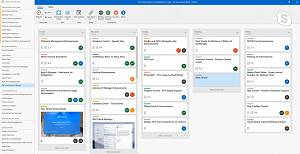 [Click on image for larger view.] Data Grid Kanban Board Demo (source: DevExpress).
"As I said, it's a view-based architecture so you can present your information to your end-users via several different presentation metaphors," said Bucknall, who demoed the company's products live with Green and showed metaphors including a file manager/explorer type, tiles, Kanban Board and more.
He also showed a spreadsheet control and others.
One thing that got Green excited was the company's own DirectX rendering engine that powers component rendering (GDI+ can also be used). DirectX Hardware Acceleration was introduced by DevExpress for a number of its WinForms Controls, including Data Grid, Chart, Scheduler, and Pivot Grid.
"That's exciting," Green said.
Bucknall said DirectX was developed as an alternative to GDI+ to meet modern tech like high-DPI 4K displays, forcing modern desktop apps to deal with pixel densities some eight times higher than when GDI+ was first created or envisaged.
"With the range of controls that we have that do support DirectX now, you can add more information within your applications," Bucknall said. "Charting especially, if you're doing real-time charts, for example, DirectX makes a great difference to that feature requirement of your app." He pointed to a video that demonstrated performance improvements to the Data Grid control when used with DirectX. Along with speed improvements, memory benefits were also mentioned.
Turning to WPF, Bucknall demoed a Diagram control, Designer control and Gantt chart control. Speaking of the Diagram control, Bucknall said, "What this gives you is you've got opportunity to write your application and have some kind of diagram, so you can show things like flowcharts within your application."
"That's a great overview of the controls," Green said in conclusion. "Some of them, they've obviously been in there forever, some new. I love the DirectX support, that's really going to speed things up."
The entire 26-minute video can be viewed here.
About the Author
David Ramel is an editor and writer at Converge 360.