News
VS Code Java Tool Updates Debugging, Refactoring
The monthly update to the tooling that boosts Java development in the open source, cross-platform Visual Studio Code editor highlights debugging, refactoring and more.
Java tooling is provided through various VS Code extensions, which can be downloaded together with the Java Pack Installer from Microsoft's Java in Visual Studio Code page.
The Java Extension Pack is available in the editor's marketplace. The package of six different extensions has been downloaded more than 4.4 million times. Still marked by a "Preview" flag, it has earned an average 4.1 (scale to 5) rating from 24 developers who reviewed it.
In announcing the May 2020 update, Yaojin Yang, senior program manager, noted some relatively minor improvements in functionality, compared to last month's update that increased performance, added support for Java 14 and more.
Debugging has been improved with the new ability to attach the debugger by process ID, which requires the latest version of the debugger extension and a configuration tweak to enable the new functionality.
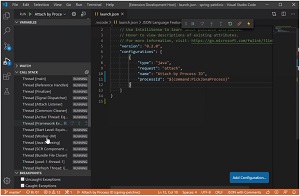 [Click on image for larger, animated GIF view.]Attach Debugger by Process ID in Animated Action (source: Microsoft).
Refactoring has also been improved, such that renaming a folder via the file explorer will now automatically kick off a package refactoring. Developers can then configure this to always happen automatically or choose to see a preview of changes before kicking it off manually. Or it can be turned off completely.
Another highlighted change is the display of the Java language level on the editor's status bar.
"As Java evolves, developers need deal with language level," Yang said. "Today, VS Code applies language level for your project based on project setting. As an enhancement, now VS Code's status bar displays the language level directly, so no need open your project file to look for it anymore. When you click the language level on status bar, it will take you to 'java.configuration.runtimes' setting, where you can configure your JDK settings. To get the benefit of this enhancement, you need the latest version of Language Support for Java extension and set active editor tab to a '.java' file."
Other minor tweaks include:
- The "Create Java Project" command now allows developers to select creating a Java project with Maven support (as long as the Maven extension is installed) or a project without any build tools.
- A new argument of "sourcePaths" supports specifying the source path as part of customer configuration for running tests. It can be found under "java.test.config" in the preference settings.
- A new "Import Java projects in workspace" command lets developers add a module into an opened project without restarting the window.
Yang also detailed the process of bulk generating getters and setters.
About the Author
David Ramel is an editor and writer at Converge 360.