News
VS Code Java Project Explorer Gets Better
The recently introduced project view for managing Java projects in Visual Studio Code received several enhancements in the latest update to Java functionality provided in Microsoft's popular open source, cross-platform code editor.
The project view -- or "JAVA PROJECTS explorer" as the dev team calls it -- was introduced in August of last year as part of an effort to improve the "getting started" experience with Java on VS Code.
As detailed in "Java project management in VS Code" documentation, it provides one view to help developers more easily view projects and their dependencies while providing entry points for project management tasks such as organizing and configuring assets, setting up environments and so on. Developers can switch between a hierarchy view and flat view.
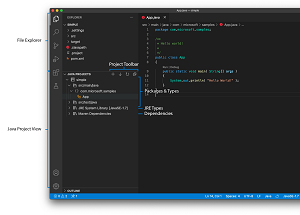 [Click on image for larger view.] Project View (source: Microsoft).
"Our goal is to allow you accessing all project management related functions through the single view," Microsoft said at the time. "The view is realized through Project Manager for Java extension. Since the extension is an update from previous Java Dependency Viewer extension, if you have already installed the Java Dependency Viewer extension, then you just need update it to the latest version."
The Project Manager for Java extension's listing on the VS Code Marketplace shows it has been installed nearly 5.9 million times.
In announcing the December 2020 update to Java on VS Code, Yaojin Yang, senior program manager in the Developer Division at Microsoft, said work to improve the project manager was a focus point for the new iteration.
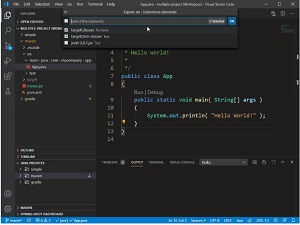 [Click on image for larger, animated GIF view.] Exporting to JAR from Project View in Action (source: Microsoft).
Here is how he described several enhancements:
- Run: Now, you can run your application directly from JAVA PROJECT explorer. Before trying, please make sure you install the latest version of Debugger for Java extension.
- Update project: 'Update Project' is a function you may use, when Maven or Gradle dependencies are modified or you want to simply keep your project updated. Previously, to invoke the function, you have to use VS Code file explorer. Now, the function is also available through JAVA PROJECTS explorer by right-clicking project node.
- Navigate to dependency's POM file: Right-clicking a dependency on POM file and then selecting Go to Definition open dependency's POM file.
- Key bindings: New bindings are added for you to interact with files more easily from JAVA PROJECT explorer.
Support for Java in Visual Studio Code is provided through a wide range of extensions, many of which are bundled in the Java Extension Pack.
About the Author
David Ramel is an editor and writer at Converge 360.