News
Teams Toolkit 3.0 Boosts Multiple Developer Collaboration
Microsoft's Teams Toolkit 3.0 has debuted with several new features, including better multiple developer collaboration and improved multi-environment management.
The company has said the toolkit is the fastest way to ramp up on building Teams apps with Microsoft 365 and Azure integrations. It's available in the Visual Studio Code Marketplace as a preview extension. The tool helps developers create, debug and deploy Teams apps with integrated identity, access to cloud storage and data from Microsoft Graph and other Azure and Microsoft 365 services, providing a 'zero-configuration' approach to the developer experience.
It comes with a visual interface and a command-line tool (TeamsFx CLI), providing:
- Tabs: These are Teams-aware embedded web pages consisting of simple HTML tags that point to domains declared in the app manifest and can be added as part of a channel inside a team, group chat or personal app for an individual user.
- Bots: These allow users to interact with a developer's web services through text, interactive cards and task modules.
- Messaging Extension: This allows users to interact with a developer's web services through buttons and forms in the Microsoft Teams client.
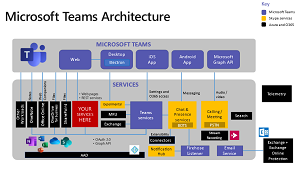 [Click on image for larger view.] Teams Architecture (source: Microsoft).
In the new v3.0 extension, it's now easier to collaborate with other developers.
"Have you wished it was easier to collaborate on a Teams app project with your coworkers?" asked Tomomi Imura of the dev team in a Dec. 2 blog post announcing v3.0. "Well, I have good news! This much-anticipated feature to manage multiple environments was introduced in the latest version of Teams Toolkit, and it supports project collaborations among multiple developers. Previously, you needed to manually handle the permissions for Teams and Azure AD. But from now on, the Toolkit handles this for you."
Multi-environment management, meanwhile, is enhanced with the ability to add a more remote environment beyond the current "local" and "dev" (for remote) default environments that are generated when a new project is created with the toolkit.
This is useful, Imura said, because developers typically start developing in a local environment but will eventually need to manage multiple environments. "Besides your local env, you probably end up having multiple environments, such as 'dev,' 'qa,' 'stage' and the production environment to deploy."
For more information on this, Microsoft has provided guidance to Manage multiple environments in Teams Toolkit.
Also detailed in the announcement are:
- Provision Azure resources using ARM and Bicep: Developers now can declaratively provision to author an ARM (Azure Resource Manager) template. That is a set of Bicep files (Bicep is a domain-specific language that uses declarative syntax to deploy Azure resources) that defines the infrastructure and configuration for a project.
- CI/CD support: Developers now can enable CI/CD workflows to automate Teams app development processes for those multiple-environment scenarios described above. As examples, the post explains how to set up GitHub Actions or set up CI/CD pipelines with other software, such as Azure DevOps or Jenkins, for which the team has prepared sample configuration files (along with others).
"I hope these new features give more confidence to your Teams app development workflow and we are looking forward to seeing your amazing apps on production!" Imura said in conclusion.
About the Author
David Ramel is an editor and writer at Converge 360.