News
With Windows App SDK Update Coming, Microsoft Lauds Growing Ecosystem
With Windows App SDK v1.1 coming up soon, Microsoft is showing some love to vendors who have contributed to a growing ecosystem of third-party components, controls and other offerings for the Windows app development scheme.
The Windows App SDK reached v1.0 status last November, after formerly being called "Project Reunion" because it unified two Windows app development API approaches that were created with the debut of the Universal Windows Platform (UWP). That platform's APIs differ from those in the older Win32 platform, which is used for what is often called "classic Windows desktop development." It was the original C/C++ platform for native Windows apps, providing close-to-the-metal performance with direct access to system hardware.
UWP, meanwhile, was described as a "modern" take on Windows development that came with a common type system, application model and APIs for all Windows 10 devices. UWP effectively containerized those apps with lower privilege levels and package identity, delivering them with an MSIX installer.
The Windows App SDK unifies these disparate API sets, decoupling them from the OS and providing them through NuGet, because Microsoft eventually decided "Windows development is hard" with the split API scheme.
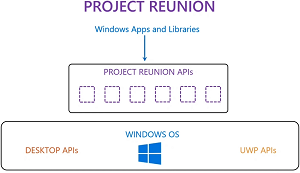 [Click on image for larger view.] Project Reunion (source: Microsoft).
"The Windows App SDK does not replace the Windows SDK or existing desktop Windows app types such as .NET (including Windows Forms and WPF) and desktop Win32 with C++," Microsoft says. "Instead, the Windows App SDK complements these existing tools and app types with a common set of APIs that developers can rely on across these platforms."
In a recent blog post, Microsoft noted that a v1.1 update is in the works.
"In the near term, we plan to release Windows App SDK 1.1 Experimental in the next few weeks and Windows App SDK 1.1 GA in late Q2, with preview releases that will ship alongside these stable releases," Microsoft said. "Throughout the next calendar year, more technologies will be coming to WinAppSDK, such as multi-window support and push notifications."
According to the product portal that serves as a project roadmap, other planned features include environmental variables API, restart for all desktop apps, local toast notifications and self-contained (XCopy) deployment support:
 [Click on image for larger view.] Planned Work for v1.1 (source: Microsoft).
The team also highlighted those aforementioned third-party vendors (and Microsoft's Windows Community Toolkit team) who support Windows App SDK v1.0: "These technologies provide unique features and controls to supplement WinUI 3." As can be seen from examining the list below, many offerings are for the UI component of the Windows App SDK, called WinUI 3.
- DevExpress: DevExpress has released 20 new WinUI controls with Windows App SDK 1.0 support, including the Data Grid, Scheduler, Charts, Ribbon Toolbar, WinUI Reporting, and more. All 20 UI components are available free of charge to get started!
- GrapeCity: ComponentOne WinUI Edition includes a powerful data grid with cell customization and high-performance virtualization, essential calendar and accordion layout controls, fluent styles, and support for desktop (Win32) applications.
- Infragistics: Ultimate UI for WinUI + Windows App SDK 1.0 bringing business-critical, high-performing, and feature-rich line of business controls to your apps that target any platform that runs Windows (including Windows on ARM64). Preview available now!
- ArcGIS Runtime SDK for .NET (ESRI): Adds mapping, spatial analytics, and location intelligence capabilities to your apps on Android, iOS, and Windows. Support for WinUI 3 is now available with samples [github.com] to jumpstart your journey today!
- Uno Platform: Use WinUI 3 -- Windows App SDK 1.0, XAML and C# to build pixel-perfect, single-codebase, native applications that can run on Web, Desktop and Mobile. It is free, open-source and available today.
- Syncfusion: A state-of-the-art WinUI toolkit with 25+ controls including DataGrid, Chart, Scheduler and File Formats libraries (Excel, PDF, Word and PowerPoint). Check out the WinUI Controls page for more details and demos.
- Telerik UI for WinUI: The market first and biggest (40+) UI components suite for crafting Win32 apps with WinUI 3, comes with feature-rich controls like Scheduler, Ribbon, DataGrid, Charts, Gauges, Barcodes and more. It also provides a bundle of document processing libraries to enable processing the most used document file formats.
- Windows Community Toolkit (Microsoft): The WCT currently supports Windows App SDK 1.0! It provides tons of new controls and capabilities for use in your WinUI app. You can find out more about using it with WinUI 3 here.
About the Author
David Ramel is an editor and writer at Converge 360.