News
Microsoft Previews Edge Developer Tools for Visual Studio IDE
Microsoft is previewing Microsoft Edge Developers Tools for Visual Studio with an extension now available in the IDE's marketplace that lets developers preview ASP.NET and ASP.NET Core projects.
It joins a similar tool for Visual Studio Code, which has been available for years and installed more than 460,000 times.
"In addition to seeing a preview of your web app, you can use the Edge Developer Tools Elements tool to modify CSS, says the description of the Edge Developer Tools item in the marketplace. "Modifications will automatically be applied to your source files."
As shown in the animated GIF below, the tool presents a Preview button in the bottom left-hand side of the editor, which when clicked builds a page and renders it in the tool window.
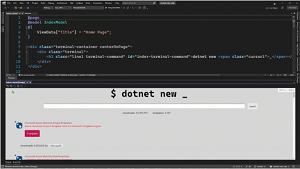 [Click on image for larger, animated GIF view.] Automatic CSS Updates in Animated Action (source: Microsoft).
CSS changes can be made in the Elements tool and applied to source files automatically.
The Network tool, meanwhile, lets developers see the web requests that are made upon a page refresh.
As an "early preview," the tool lacks some functionality right now, including Blazor support, which is said to be coming soon.
"We are releasing these features as an early preview so that we can get feedback from the community," the tools marketplace entry says. "The best way to give feedback is directly inside of Visual Studio using Report a Problem. When reporting issues it's best to check the checkbox to include Log files. These files contain information that is needed so that we can diagnose the issue."
Besides the lack of Blazor support, other known issues include:
- ASP.NET Core console window: When working with ASP.NET Core apps, when you click the Preview button a new external console window.
- CSS changes require the file to be saved: When modifying CSS the updates will not be applied as you type, you will need to save the file for changes to be pushed to the preview window.
- Scroll position reset after making CSS changes in the Edge Developer tools: When editing CSS via the Edge Developer Tools, if you modify sources for a CSS file that is currently open in the Visual Studio editor, the editor will scroll the file to the top when making CSS changes. We will address this in a future update.
- Warning about line endings: If you make changes to a CSS file using the Edge Developer tools in Visual Studio, the next time you open that CSS file, you may receive a warning about inconsistent line endings.
The extension, which requires Visual Studio 2022 17.1 or later, was published on Feb. 28 and as of this writing, two days later, it has been installed 131 times.
About the Author
David Ramel is an editor and writer at Converge 360.