News
Microsoft Previews Revamped 'WordPress on App Service' on Azure
Microsoft is previewing a new and improved WordPress on App Service on its Azure cloud computing platform.
According to the site for WordPress on App Service, it "lets you quickly build, deploy, and scale enterprise-grade web, mobile, and API apps running on any platform. Meet rigorous performance, scalability, security and compliance requirements while using a fully managed platform to perform infrastructure maintenance."
A Feb. 22 blog post says: "We have made some significant improvements based on feedback from many WordPress developers and in close collaboration with the ever-growing WordPress community This new offering will improve your experience, and help your websites run faster."
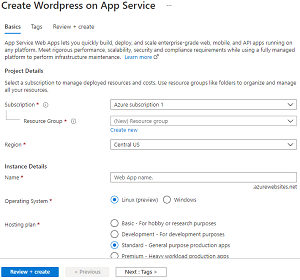 [Click on image for larger view.] WordPress on App Service (source: Microsoft).
The revamp involved performance, caching, image compression and hosting plans.
Specifically, the updates include:
- Updated image: We have made sure that whenever you deploy a new WordPress website, you get the latest stable versions of WordPress and PHP. This will ensure that your websites are up to date with all updates and security fixes.
-
Performance: Performance is at the core of everything we do. We want your websites to be highly performant so that your visitors have a great browsing experience. Our super low response times will ensure that your website visitors will create and consume content with ease. We have made a lot of WordPress recommended optimizations like using non default permalink structures, pagination of comments, using optimal PHP settings, and more. Two most important performance enhancements we have carried out are:
- Caching: The WordPress installation comes with pre-installed W3TC plugin which uses a local Redis cache for faster processing of requests. Caching is implemented for WordPress pages, objects, and the database.
- Image Compression: The WordPress installation comes with the pre-installed Smush Plugin with recommended settings. When an image is uploaded multiple resized copies of the same image are generated and stored. This helps us deliver minimal load times with the best quality image possible.
- 4 Hosting Plans: We understand that not every WordPress website is the same. Some WordPress developers build personal blogs as a hobby while some build traffic heavy ecommerce websites. There is not a one-size-fits-all solution. Now you have the option to choose one from our 4 SKUs depending on your requirements. You always have the option of scaling up and scaling out using your AppService/ Database. The plans include:
- Basic: Use this plan if you are setting up a blog or a portfolio website as a hobby or if you are learning WordPress.
- Development: Use this plan if you are an advanced user of WordPress and want to develop WordPress websites.
- Standard: Use this plan for general purpose production applications.
- Premium: Use this plan for heavy workload production applications.
More information and guidance is available in "Create WordPress on App Service - Microsoft Azure" and "QuickStart: Create a WordPress site - Azure App Service | Microsoft Docs."
About the Author
David Ramel is an editor and writer at Converge 360.