News
Avalonia VS Code Tool Now in Preview for Everyone
"We know you've been waiting for this!" said Avalonia UI in announcing general access to its Visual Studio Code extension for working with the popular open source, cross-platform UI framework for .NET.
After a milestone Avalonia v11 release, the company earlier this month provided early access to the tool to sponsors of the project. As of yesterday, Aug. 29, the tool was made available for everyone to try.
Avalonia UI is supported by a large and engaged community championing open source alternative tooling in the .NET-centric developer space for creating desktop, mobile, web and embedded applications using a single codebase.
As explained in the Avalonia for Visual Studio Code GitHub repo, the tool supports Avalonia XAML autocomplete and an XAML previewer.
- XAML Code completion: This functionality is powered by the same code completion engine available for Visual Studio on Windows, providing a rich syntax highlighter and contextual code complete to make it easier to read and write XAML files.
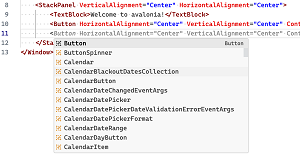 [Click on image for larger view.] XAML Code Completion (source: Avalonia).
-
Integrated XAML Previewer: This tool lets devs visualize XAML code in real-time in order to efficiently design and fine-tune UIs by identifying potential issues and seeing changes reflected instantly.
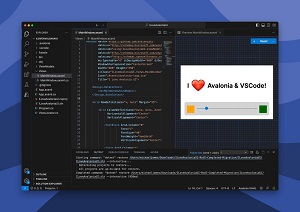 [Click on image for larger view.] XAML Previewer (source: Avalonia).
"Keep in mind that it's a preview release. We welcome all your feedback!" said Avalonia UI in a post on the social media platform formerly called Twitter.
As of this writing, the brand-new tool has been installed 163 times, with no reviews or ratings. The company's Avalonia for Visual Studio 2022 extension, meanwhile, has been installed more than 60,000 times, while a version for Visual Studio 2019/2017 has been installed nearly 80,000 times.
About the Author
David Ramel is an editor and writer at Converge 360.