News
Blazor Creator Unveils 'Smart Components' for Adding AI to .NET Apps
Microsoft's Steve Sanderson, the creator of Blazor, introduced his latest pet project, Smart Components for easy AI-driven interfaces in .NET apps.
"Each smart component is a prebuilt, end-to-end AI feature that you can take and use in your application," the software engineer explained in an introductory video published Monday. "And the best part is, each smart component is a drop-in upgrade to UI elements that you're already using."
Smart Components basically abstract away all the complex behind-the-scenes AI work normally needed to infuse apps with AI capabilities, such as natural language processing (NLP), machine learning (ML) and so on with tools like Microsoft's Semantic Kernel. The components are designed to be easily added to existing apps, with the AI capabilities mostly provided by API calls, along with locally hosted, customized models tailored for specific functionality.
An experimental project from the .NET team, the components now work with ASP.NET Core 6.0 and later, with upcoming support for Blazor and MVC/Razor Pages. They might also be used to bolster UI tech for native apps, depending on how the project is received. Previous Sanderson-spearheaded experiments resulted in Blazor, Blazor Hybrid and other offerings.
"You don't have to spend weeks of dev time redesigning your UX or researching machine learning and prompt engineering," the project's GitHub repo says. "Smart Components are prebuilt end-to-end AI features that you can drop into your existing UIs to upgrade them, truly making your app more productive for your end users."
Right now there are three AI-supercharged components that Sanderson showed off in his video that enhance common UI elements (with descriptions coming from the GitHub repo):
- Smart Paste: A button that fills out forms automatically using data from the user's clipboard. You can use this with any existing form in your web app. This helps users add data from external sources without re-typing.
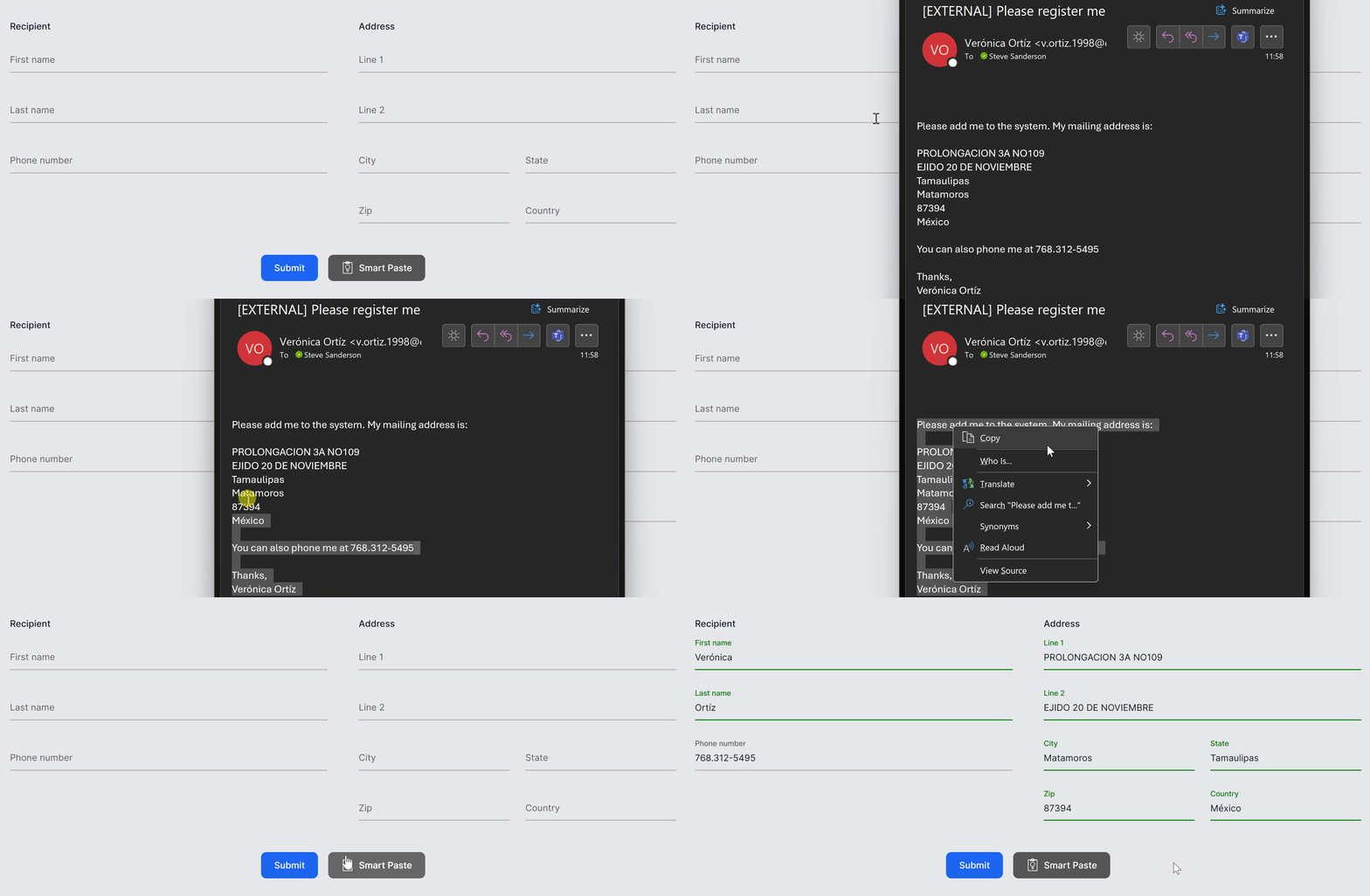 Smart Paste in Animated Action (source: Microsoft).
- Smart TextArea: An intelligent upgrade to the traditional textarea. You can configure how it should autocomplete whole sentences using your own preferred tone, policies, URLs, and so on. This helps users type faster and not have to remember URLs etc.
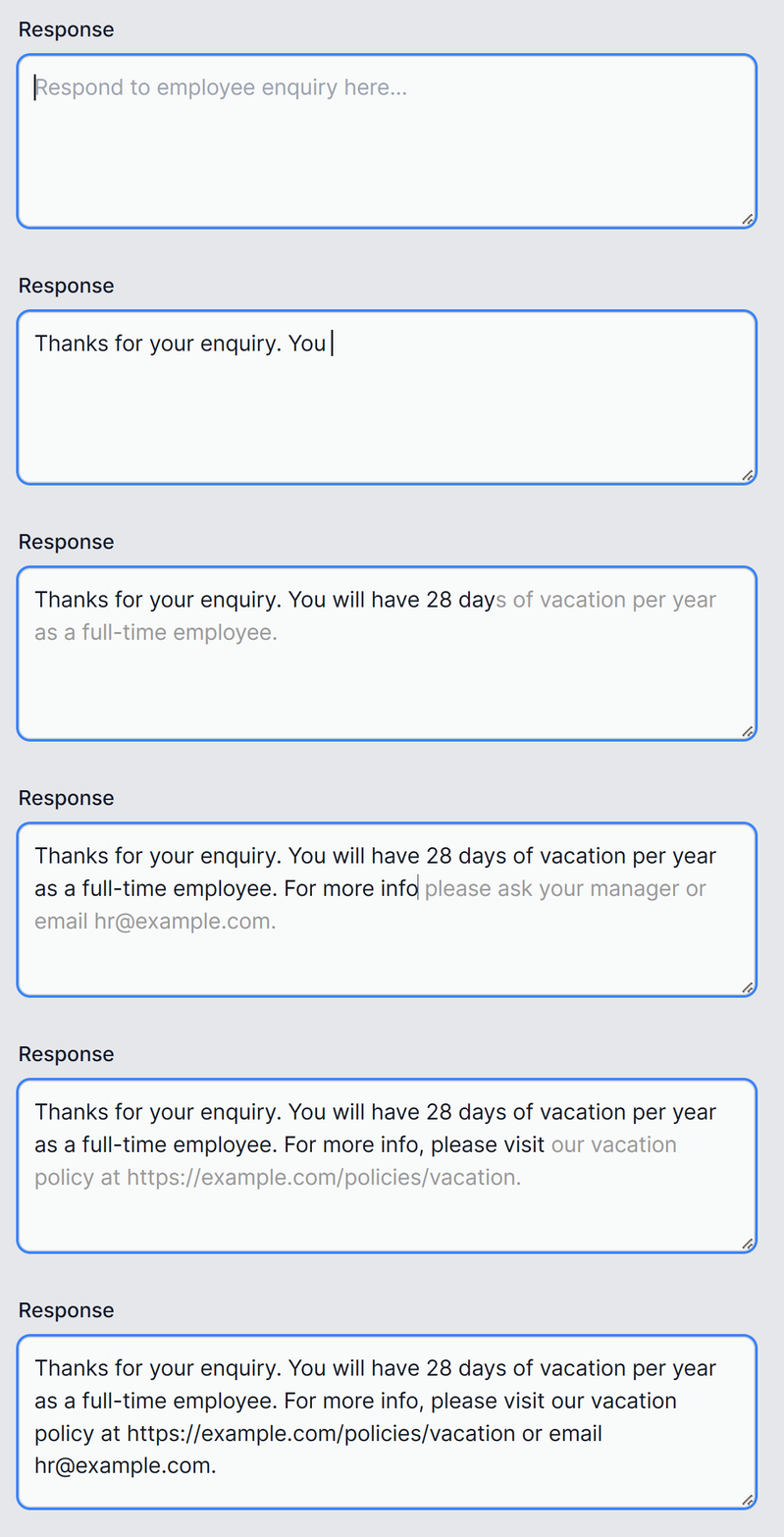 Smart TextArea in Animated Action (source: Microsoft).
- Smart ComboBox: Upgrades the traditional combobox by making suggestions based on semantic matching. This helps users find what they're looking for.
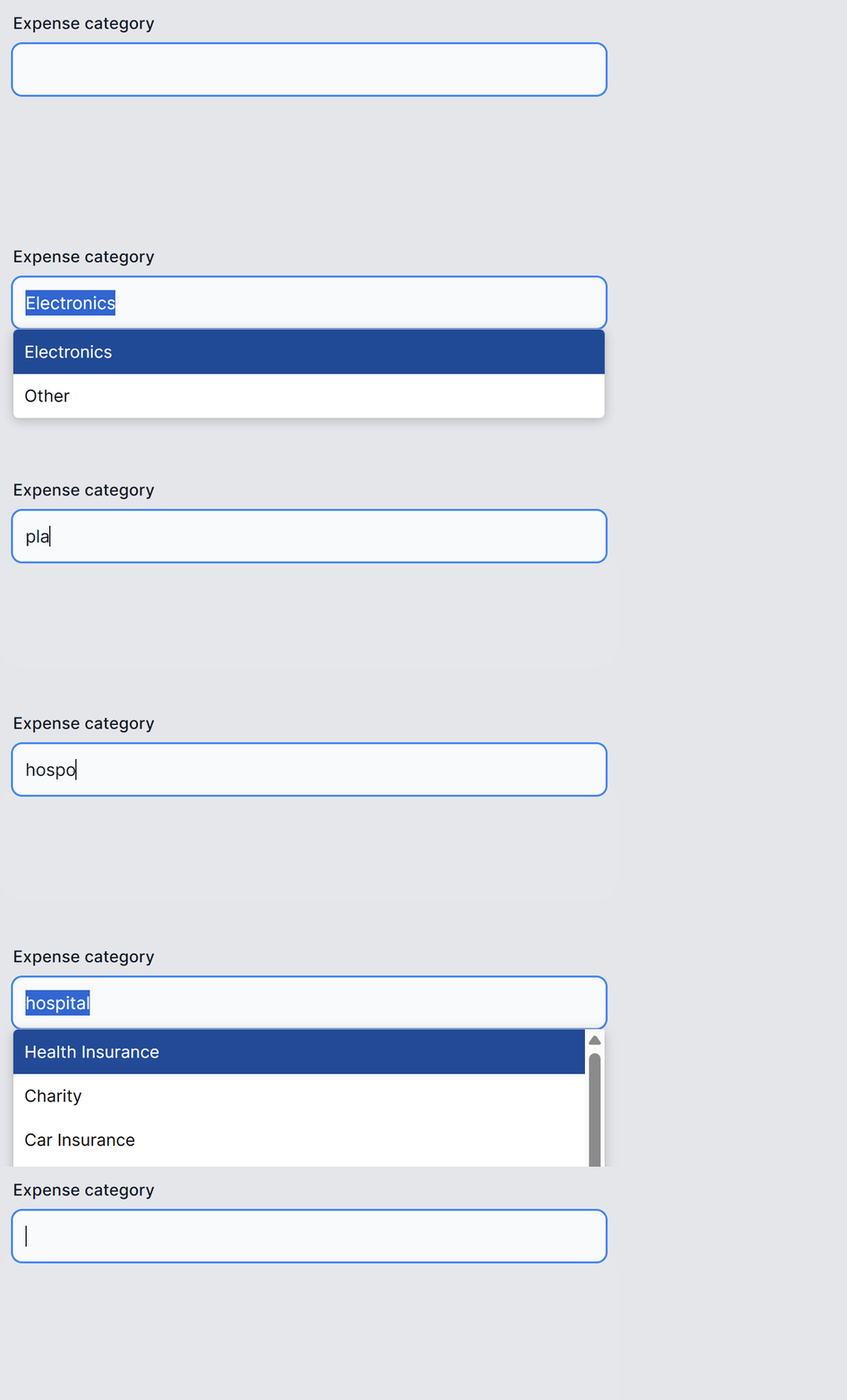 Smart ComboBox in Animated Action (source: Microsoft).
The project also supports local embeddings that can be used, for examples, to compute the level of semantic similarity between two natural language strings, or to find the closest match from a set of candidates. These aren't prebuilt UI features, but rather provide general capabilities that are powered by the local CPU and thus aren't dependent upon an external AI service like Smart Components, which (except Smart ComboBox) hook into OpenAI APIs.
Heres' how Sanderson introduced his video:
If you develop web apps or native apps today, then you've got a great opportunity to add AI features to your app. This could help you stand out from the competition, as well as make your users more delighted and productive than before.
But how much work is this going to be? Will you have to start by spending weeks or months learning about AI programming before you start learning about models and prompt engineering, about the OpenAI APIs, Semantic Kernel, embeddings, vector databases, quantization, RAG? Wow. Okay.
And after you've learned all that, then of course, you implement something and then, what, you have to redesign all your existing UIs to fit around the new AI features? Well, maybe, but there's quite a bit of risk, right, you're doing a lot of work. And maybe somewhere along the way you could take a wrong turn, and perhaps what you deliver might not be something that your users even wanted.
So could there be a better way, a way to deliver this kind of value much more easily and quickly, with less risk to you? Well, that's something we're trying out with Smart Components.
To try them out yourself, you need a current .NET SDK and a repo clone. And, for Smart Paste and Smart TextArea, you need an OpenAI API secret key.
The team is actively soliciting developer feedback -- even "Yes I want this" or "I won't use this because..." comments -- that can be submitted here.
Update: About 15 minutes after this article was published, Microsoft's Daniel Roth posted, "Introducing .NET Smart Components -- AI-powered UI controls."
About the Author
David Ramel is an editor and writer at Converge 360.